
SpringCloud
1、简介
解决方案:
SpringCloud 生态
SpringCloud NetFlix 一站式解决方案!
api网关,zuul组件
Feign —— httpClient —— Http通信方式,同步,阻塞
服务注册发现:Eureka
熔断机制:Hystrix
(2018年停更的)
Apache Dubbo zookeeper 半自动,需要整合别人的
API:没有,找第三方组件,或者自己实现
Dubbo
zookeeper
熔断机制:借助Hystrix
Dubbo并不完善~
SpringCloud Alibaba 一站式解决方案!
新创建的
新概念:服务网格 Server Mesh
解决的问题:
- API
- HTTP,RPC
- 注册和发现
- 熔断机制
原因:网络不可靠
2、微服务概述
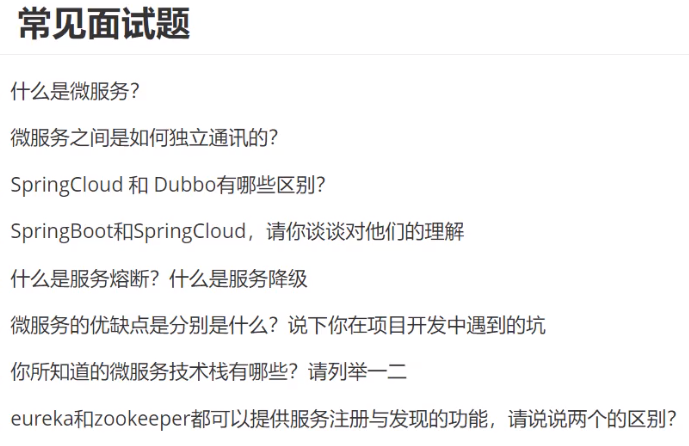
2.1、什么是微服务
维基上对其定义为:一种软件开发技术- 面向服务的体系结构(SOA)架构样式的一种变体,将应用程序构造为一组松散耦合的服务。在微服务体系结构中,服务是细粒度的,协议是轻量级的。
微服务(或微服务架构)是一种云原生架构方法,其中单个应用程序由许多松散耦合且可独立部署的较小组件或服务组成。这些服务通常
- 有自己的堆栈,包括数据库和数据模型;
- 通过REST API,事件流和消息代理的组合相互通信;
- 它们是按业务能力组织的,分隔服务的线通常称为有界上下文。
- 可以更轻松地更新代码。
- 团队可以为不同的组件使用不同的堆栈。
- 模块化,可以使用不同的语言来编写服务,也可以使用不同是数据存储
2.2、微服务与微服务架构
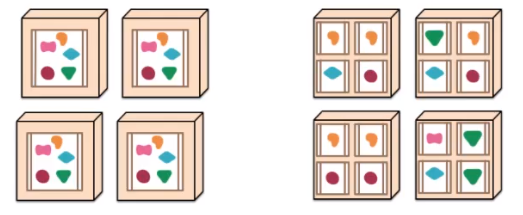
微服务
强调的是服务的大小,关注的是某一个点,是具体解决某一个问题对应的一个服务应用,狭义的看,可以看做是IDEA中的一个个微服务工程或者Moudel
微服务架构
一种新的架构形式,Martin Fowler,2014年提出
微服务架构是一种架构模式,它提倡将单一应用程序划分成一组小的服务,使服务之间相互协调,互相配合,为用户提供最终的价值。对具体的一个服务而言,应根据业务上下文,选择合适的语言、工具对其进行构建。
2.3、微服务优缺点
优点
- 单一职责原则
- 每个服务足够内聚,足够小,代码容易理解,缺一不可
- 开发简单,开发效率提高,一个服务可能就是专一的干一件事
- 微服务能够被小团队单独开发,这个小团队是2~5人的开发人员组成
- 微服务是松耦合,有功能意义的服务,都是独立的
- 可以使用不同的语言开发
- 易于和第三方集成,微服务允许容易且灵活的方式集成自动部署,如jenkins,Hudson,bamboo
- 微服务是业务逻辑的代码,不会和HTML,CSS或其他界面混合
- 每个微服务有自己的存储能力,可以有自己的数据库,也可以有统一数据库
缺点
- 开发人员要处理分布式系统的复杂性
- 随着服务的增加,运维的压力也在增大
- 系统部署依赖
- 服务间通信成本
- 数据一致性
- 系统集成测试
- 性能监控
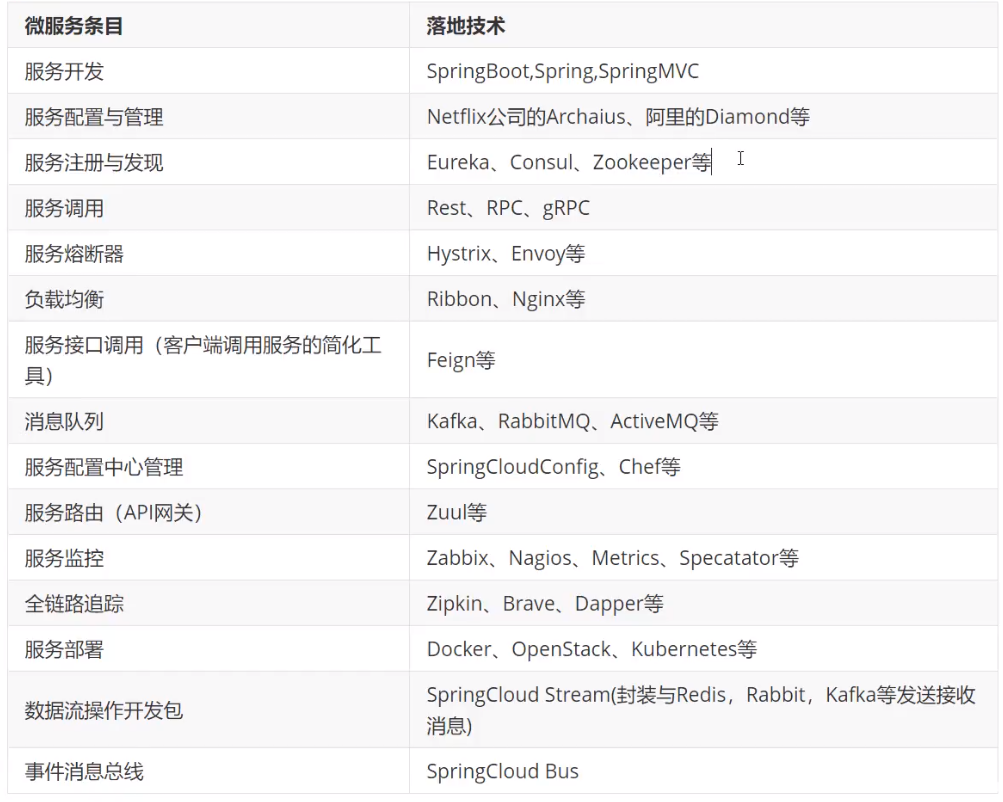
2.4、微服务技术栈
2.5、为什么要选择SpringCloud作为微服务架构
选型依据
- 整体解决方案和框架成熟度
- 社区热度
- 可维护性
- 学习曲线
当前各大IT公司的微服务架构有哪些
- 阿里:dubbo+HFS
- 京东:JSF
- 新浪:Motan
- 当当网:DubboX
- ……
各微服务框架对比
- SpringCloud NetFlix 一站式解决方案,但不再维护!
- Apache Dubbo zookeeper 半自动,需要整合别人的
- SpringCloud Alibaba 一站式解决方案,新产品!
3、SpringCloud入门概述
3.1、SpringCloud是什么
官网:https://spring.io/projects/spring-cloud
中文文档:https://www.springcloud.cc/
SpringCloud:https://www.springcloud.cc/spring-cloud-dalton.html
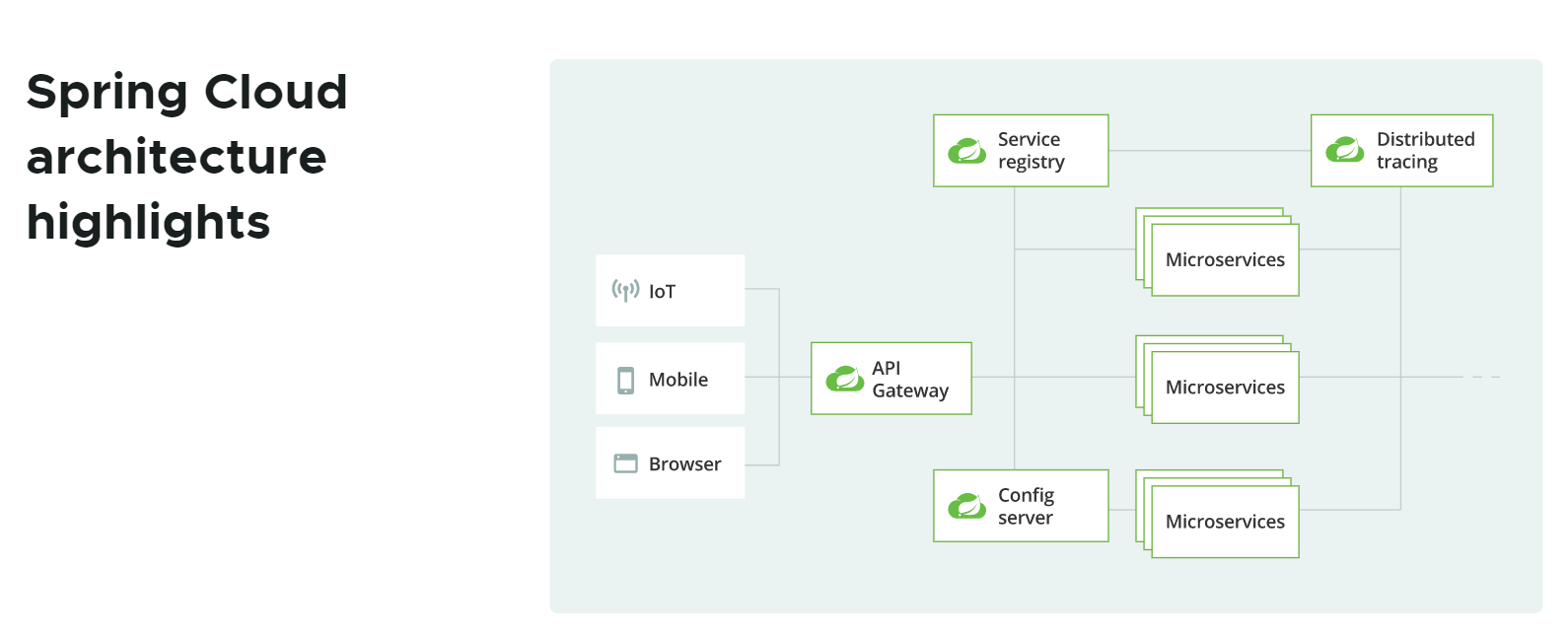
Spring Cloud为开发人员提供了工具,以快速构建分布式系统中的某些常见模式(例如,配置管理,服务发现,断路器,智能路由,微代理,控制总线,一次性令牌,全局锁,领导选举,分布式会话,群集状态)。分布式系统的协调导致样板式样,并且使用Spring Cloud开发人员可以快速站起来实现这些样板的服务和应用程序。
Spring Cloud专注于为典型的用例和扩展机制(包括其他用例)提供良好的开箱即用体验。
3.2、SpringCloud和SpringBoot关系
- SpringBoot专注于快速方便的开发单个个体微服务
- SpringCloud是关注全局的微服务协调整理治理框架,它将SpringBoot开发的一个个单体微服务整合并管理起来,为各个为服务之间提供:配置管理,服务发现,断路器,路由,微代理,事件总线,全局锁,决策竞选,分布式会话等等集成服务
- SpringBoot可以离开SpringCloud独立使用,开发项目,但是SpringCloud离不开SpringBoot,属于依赖关系
- SpringBoot专注于快速、方便的开发单个个体微服务,SpringCloud关注全局的服务治理框架
3.3、Dubbo和SpringCloud技术选型
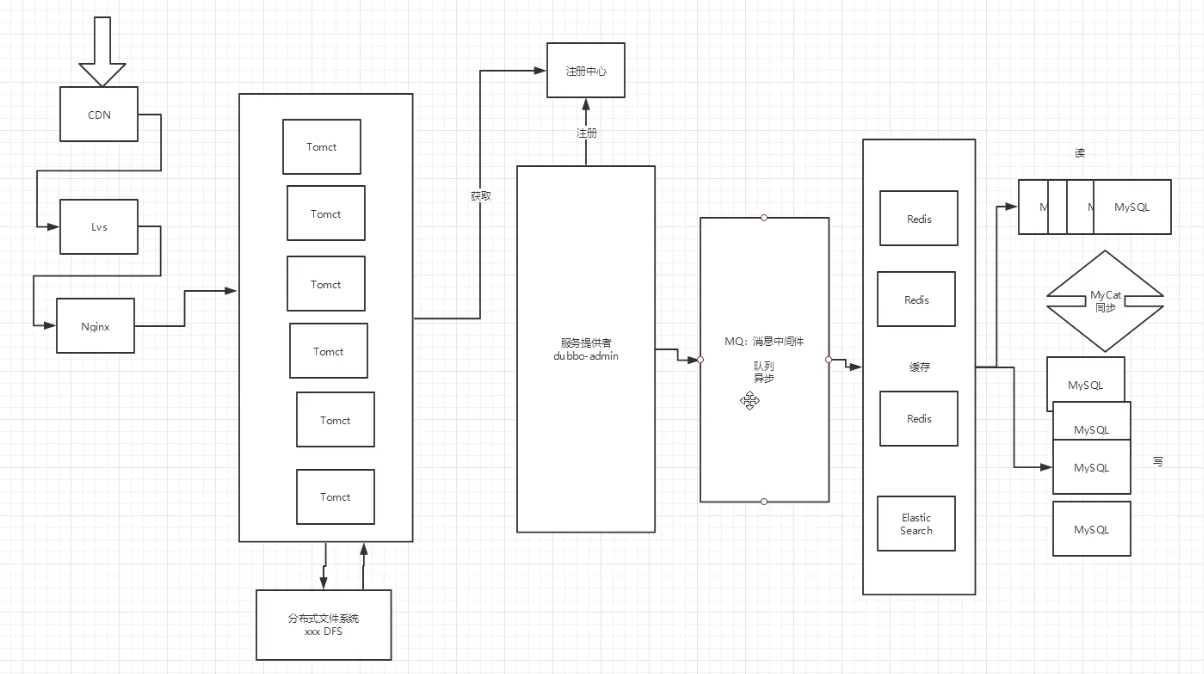
分布式+服务治理Dubbo
目前成熟的互联网架构:应用服务化拆分+消息中间件
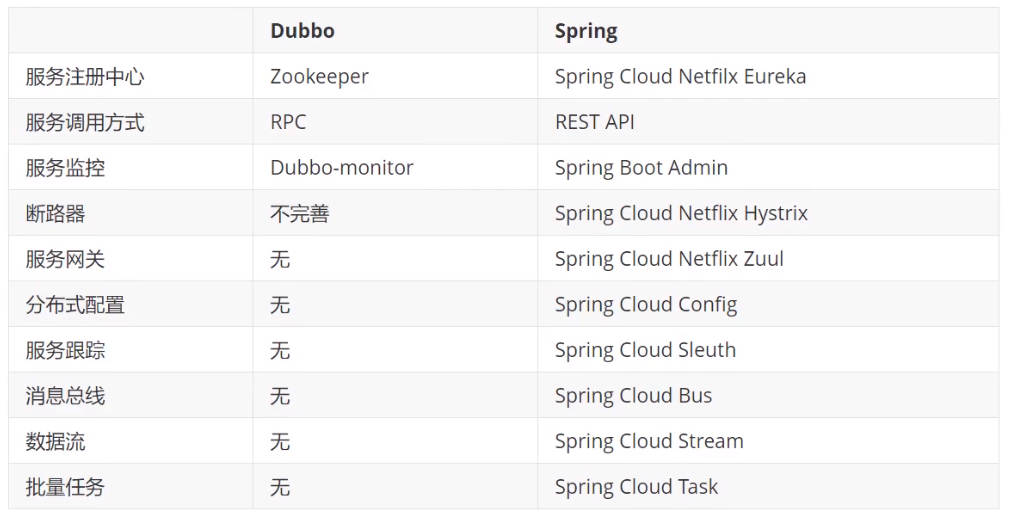
Dubbo和SpringCloud对比
SpringCould能干嘛
Spring Cloud专注于为典型的用例和扩展机制(包括其他用例)提供良好的开箱即用体验。
- 分布式/版本化配置
- 服务注册和发现
- 路由
- 服务到服务的呼叫
- 负载均衡
- 断路器
- 全局锁
- 领导选举和集群状态
- 分布式消息传递
4、SpringCloud项目搭建
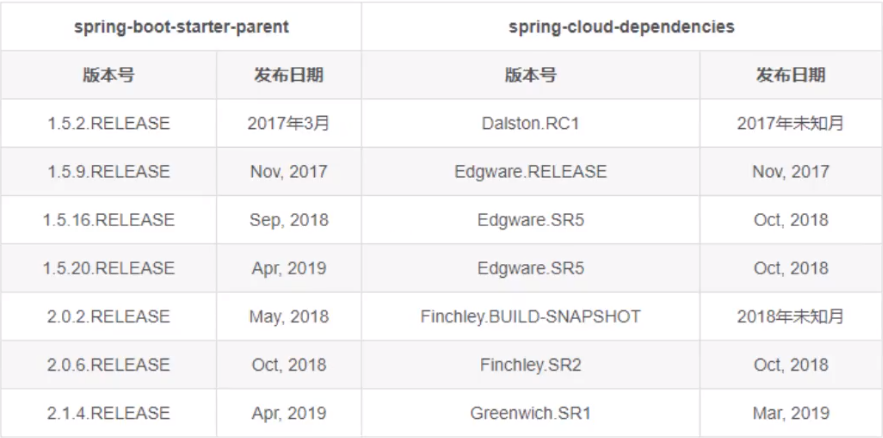
实际开发版本关系
| Spring Cloud | Spring Boot |
|---|---|
| Angel版本 | 兼容Spring Boot 1.2.x |
| Brixton版本 | 兼容Spring Boot 1.3.x,也兼容Spring Boot 1.4.x |
| Camden版本 | 兼容Spring Boot 1.4.x,也兼容Spring Boot 1.5.x |
| Dalston版本、Edgware版本 | 兼容Spring Boot 1.5.x,不兼容Spring Boot 2.0.x |
| Finchley版本 | 兼容Spring Boot 2.0.x,不兼容Spring Boot 1.5.x |
| Greenwich版本 | 兼容Spring Boot 2.1.x |
在实际开发过程中,我们需要更详细的版本对应:
| Spring Boot | Spring Cloud |
|---|---|
| 1.5.2.RELEASE | Dalston.RC1 |
| 1.5.9.RELEASE | Edgware.RELEASE |
| 2.0.2.RELEASE | Finchley.BUILD-SNAPSHOT |
| 2.0.3.RELEASE | Finchley.RELEASE |
4.1、创建父项目
创建普通Maven项目
SpringCloud,作为父项目修改
pom.xml文件,编写打包方式导入依赖
<!-- 打包方式 pom -->
<packaging>pom</packaging>
<!-- 配置版本 -->
<properties>
    <project.build.sourceEncoding>UTF-8</project.build.sourceEncoding>
    <maven.compiler.source>1.8</maven.compiler.source>
    <maven.compiler.target>1.8</maven.compiler.target>
    <junit.version>4.12</junit.version>
    <log4j.version>1.16.10</log4j.version>
    <lombok.version>1.16.10</lombok.version>
</properties>

<dependencyManagement>
    <dependencies>
        <!--SpringCloud依赖-->
        <dependency>
            <groupId>org.springframework.cloud</groupId>
            <artifactId>spring-cloud-dependencies</artifactId>
            <version>Greenwich.SR1</version>
            <type>pom</type>
            <scope>import</scope>
        </dependency>
        <!-- SpringBoot依赖 -->
        <dependency>
            <groupId>org.springframework.boot</groupId>
            <artifactId>spring-boot-dependencies</artifactId>
            <version>2.1.4.RELEASE</version>
            <type>pom</type>
            <scope>import</scope>
        </dependency>
        <!-- 数据库mysql -->
        <dependency>
            <groupId>mysql</groupId>
            <artifactId>mysql-connector-java</artifactId>
            <version>8.0.20</version>
        </dependency>
        <!--druid-->
        <dependency>
            <groupId>com.alibaba</groupId>
            <artifactId>druid</artifactId>
            <version>1.1.23</version>
        </dependency>
        <!--SpringBoot启动器-->
        <dependency>
            <groupId>org.mybatis.spring.boot</groupId>
            <artifactId>mybatis-spring-boot-starter</artifactId>
            <version>2.1.3</version>
        </dependency>
        <!--test-->
        <dependency>
            <groupId>org.springframework.boot</groupId>
            <artifactId>spring-boot-test</artifactId>
            <version>2.3.1.RELEASE</version>
        </dependency>
        <!-- junit -->
        <dependency>
            <groupId>junit</groupId>
            <artifactId>junit</artifactId>
            <!-- 从上方取依赖版本 -->
            <version>${ junit.version} </version>
        </dependency>
        <!-- Lombok -->
        <dependency>
            <groupId>org.projectlombok</groupId>
            <artifactId>lombok</artifactId>
            <!-- 从上方取依赖版本 -->
            <version>${ lombok.version} </version>
        </dependency>
        <!-- log4j -->
        <dependency>
            <groupId>log4j</groupId>
            <artifactId>log4j</artifactId>
            <!-- 从上方取依赖版本 -->
            <version>${ log4j.version} </version>
        </dependency>
        <!-- logback -->
        <dependency>
            <groupId>ch.qos.logback</groupId>
            <artifactId>logback-core</artifactId>
            <!-- 从上方取依赖版本 -->
            <version>1.2.3</version>
        </dependency>
    </dependencies>
</dependencyManagement>
4.2、创建API模块
新建一个moudle,
springcloud-api在子项目的pom文件中导入依赖,因为父项目使用的是
</dependencyManagement>方式导入的<!-- lombok --> <dependencies> <dependency> <groupId>org.projectlombok</groupId> <artifactId>lombok</artifactId> </dependency> </dependencies>创建数据库
DB01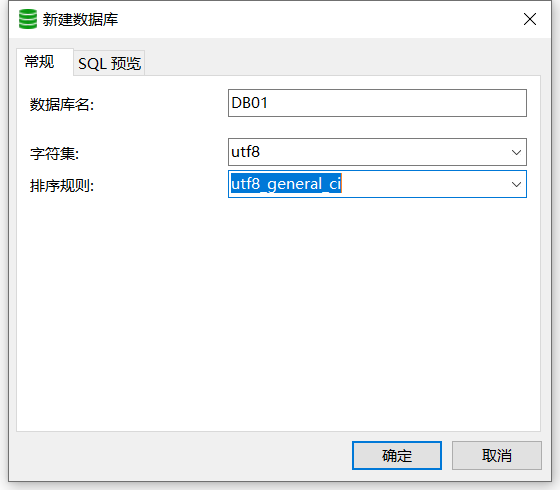
在IDEA中连接并创建数据表
dept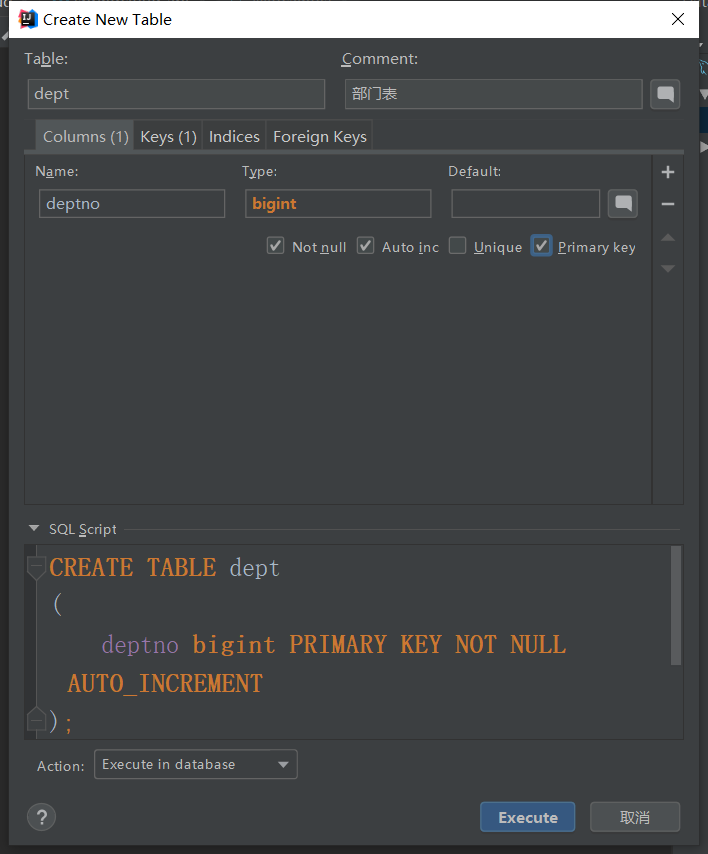
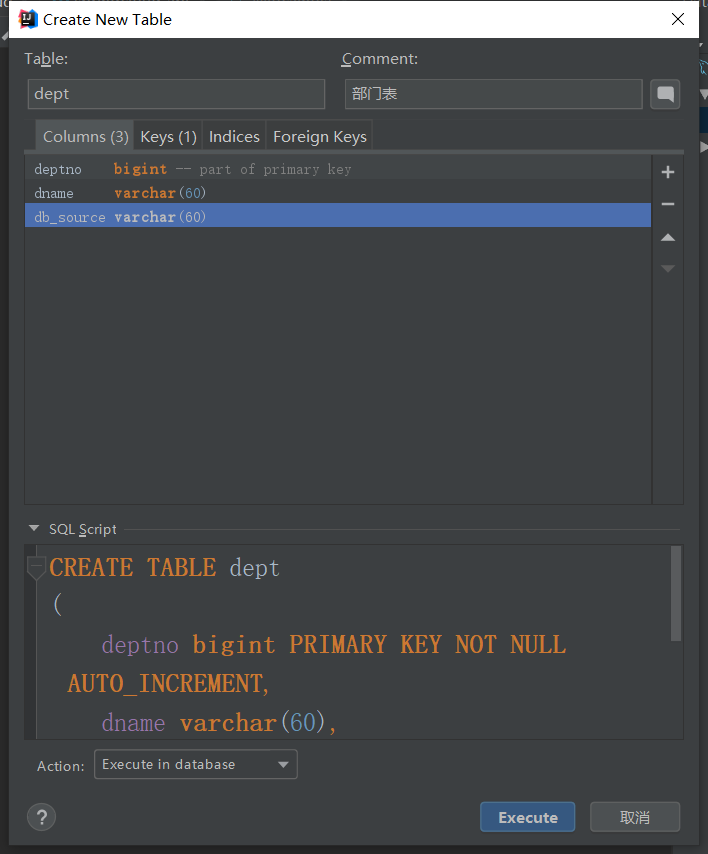
对应的sql为
CREATE TABLE dept
(
    deptno bigint PRIMARY KEY NOT NULL AUTO_INCREMENT,
    dname varchar(60),
    db_source varchar(60)
);
ALTER TABLE dept COMMENT = '部门表';
插入数据
insert into dept (dname, db_source) values ('开发部', DATABASE());
insert into dept (dname, db_source) values ('人事部', DATABASE());
insert into dept (dname, db_source) values ('财务部', DATABASE());
insert into dept (dname, db_source) values ('市场部', DATABASE());
insert into dept (dname, db_source) values ('运营部', DATABASE());
在目录
com.xj.springcloud.pojo下创建实体类Dept,需要实现Serializable序列化,防止传输报错@Data @NoArgsConstructor @Accessors(chain = true) // 开启链式写法 public class Dept implements Serializable { private Long deptno; private String dname; // 这个数据存在哪个数据库中的字段,微服务,一个服务对应一个数据库 private String db_source; public Dept(String dname){ this.dname = dname; } /* 链式写法: Dept dept = new Dept(); dept.setDeptno(11).setDname("sss").setDb_source("001"); */ }这个服务到这里就可以了
4.3、创建提供者
新创建一个模块
springcloud-provider-dept-8001导入依赖,其中的实体类点进去可以到达我们刚才写的实体类
<dependencies>
    <!--拿到我们需要的实体类api-->
    <dependency>
        <groupId>com.xj</groupId>
        <artifactId>springcloud-api</artifactId>
        <version>1.0-SNAPSHOT</version>
    </dependency>
    <!--junit-->
    <dependency>
        <groupId>junit</groupId>
        <artifactId>junit</artifactId>
    </dependency>
    <!--mysql-->
    <dependency>
        <groupId>mysql</groupId>
        <artifactId>mysql-connector-java</artifactId>
    </dependency>
    <!--数据源-->
    <dependency>
        <groupId>com.alibaba</groupId>
        <artifactId>druid</artifactId>
    </dependency>
    <!--logback-core-->
    <dependency>
        <groupId>ch.qos.logback</groupId>
        <artifactId>logback-core</artifactId>
    </dependency>
    <!--mybatis-->
    <dependency>
        <groupId>org.mybatis.spring.boot</groupId>
        <artifactId>mybatis-spring-boot-starter</artifactId>
    </dependency>
    <!--test-->
    <dependency>
        <groupId>org.springframework.boot</groupId>
        <artifactId>spring-boot-test</artifactId>
    </dependency>
    <!--web-->
    <dependency>
        <groupId>org.springframework.boot</groupId>
        <artifactId>spring-boot-starter-web</artifactId>
    </dependency>
    <!--jetty-->
    <dependency>
        <groupId>org.springframework.boot</groupId>
        <artifactId>spring-boot-starter-jetty</artifactId>
    </dependency>
    <!--热部署工具-->
    <dependency>
        <groupId>org.springframework.boot</groupId>
        <artifactId>spring-boot-devtools</artifactId>
    </dependency>
</dependencies>
编写配置
server:
  port: 8001

# mybatis配置
mybatis:
  type-aliases-package: com.xj.springcloud.pojo
  config-location: classpath:mybatis/mybatis-config.xml
  mapper-locations: classpath:mybatis/mapper/*.xml

# Spring的配置
spring:
  application:
    name: springcloud-provider-dept
  datasource:
    type: com.alibaba.druid.pool.DruidDataSource
    driver-class-name: com.mysql.cj.jdbc.Driver
    url: jdbc:mysql://localhost:3306/db01?serverTimezone=GMT&createDatabaseIfNotExist=true&useUnicode=true&characterEncoding=utf-8&autoReconnect=true
    username: root
    password: 1234
编写
mybatis-config.xml<?xml version="1.0" encoding="UTF-8" ?> <!DOCTYPE configuration PUBLIC "-//mybatis.org//DTD Config 3.0//EN" "http://mybatis.org/dtd/mybatis-3-config.dtd"> <configuration> <settings> <!--开启二级缓存--> <setting name="cacheEnabled" value="true"/> </settings> </configuration>在目录
com.xj.springcloud.mapper下创建DeptMapper@Mapper @Repository public interface DeptMapper { public boolean addDept(Dept dept); public Dept queryById(Long id); public List<Dept> queryAll(); }编写Mapper映射文件
<?xml version="1.0" encoding="UTF-8" ?>
<!DOCTYPE mapper
        PUBLIC "-//mybatis.org//DTD Mapper 3.0//EN"
        "http://mybatis.org/dtd/mybatis-3-mapper.dtd">
<mapper namespace="com.xj.springcloud.mapper.DeptMapper">
    <insert id="addDept" parameterType="Dept">
        insert into dept (dname, db_source)
        values (#{ dename} ,DATABASE());
    </insert>
    <select id="queryById" parameterType="Long" resultType="Dept">
        select * from dept where deptno=#{ deptno}
    </select>
    <select id="queryAll" resultType="Dept">
        select * from dept
    </select>
</mapper>
编写业务类
DeptService接口public interface DeptService { public boolean addDept(Dept dept); public Dept queryById(Long id); public List<Dept> queryAll(); }编写业务类
DeptServiceImpl实现类@Service public class DeptServiceImpl implements DeptService{ @Autowired private DeptMapper deptMapper; @Override public boolean addDept(Dept dept) { return deptMapper.addDept(dept); } @Override public Dept queryById(Long id) { return deptMapper.queryById(id); } @Override public List<Dept> queryAll() { return deptMapper.queryAll(); } }编写控制类
DeptController,提供Restful格式// 提供RestFul服务 @RestController public class DeptController { // 调用业务层 @Autowired private DeptService deptService; @PostMapping("/dept/add") public boolean addDept(Dept dept){ return deptService.addDept(dept); } @GetMapping("/dept/get/{ id} ") public Dept getDept(@PathVariable("id") Long id){ return deptService.queryById(id); } @GetMapping("/dept/list") public List<Dept> queryAll(){ return deptService.queryAll(); } }创建主启动类
DeptProvider_8001// 启动类 @SpringBootApplication public class DeptProvider_8001 { public static void main(String[] args) { SpringApplication.run(DeptProvider_8001.class, args); } }启动项目测试


可以发现,在该项目中,我们没有编写任何前端代码。并且在第二个项目中也没有编写实体类,是调用第一个项目的。
4.4、创建消费者
80端口代表本地,在测试的时候可以不写端口号
创建模块
springcloud-consumer-dept-80导入依赖,不需要数据库,只要实体类和web
<dependencies>
    <!--实体类-->
    <dependency>
        <groupId>com.xj</groupId>
        <artifactId>springcloud-api</artifactId>
        <version>1.0-SNAPSHOT</version>
    </dependency>
    <!--web-->
    <dependency>
        <groupId>org.springframework.boot</groupId>
        <artifactId>spring-boot-starter-web</artifactId>
    </dependency>
    <!--热部署工具-->
    <dependency>
        <groupId>org.springframework.boot</groupId>
        <artifactId>spring-boot-devtools</artifactId>
    </dependency>
</dependencies>
编写配置文件
application.yaml的端口号server: port: 80编写配置类
ConfigBean,提供RestTemplate// Configuration 注解相当于Spring中的applicationContext.xml,然后在里面注册bean @Configuration public class ConfigBean { @Bean public RestTemplate getRestTemplate(){ return new RestTemplate(); } }创建控制类(消费者)
DeptConsumerController,需要调用远程的业务层@RestController public class DeptConsumerController { // 理解:消费者不应该有service业务层 // RestTemplate 供我们直接调用业务层的url即可!它需要注册到Spring中 // (String url, Class<T> responseType, Object... uriVariables)传递地址、返回类型... @Autowired private RestTemplate restTemplate; private static final String REST_URL_PREFIX = "http://localhost:8001"; @RequestMapping("/consumer/dept/add") public boolean add(Dept dept){ System.out.println(dept); // url地址,参数,返回类型 return restTemplate.postForObject(REST_URL_PREFIX + "/dept/add?dname=" + dept.getDname(), dept, Boolean.class); } @RequestMapping("/consumer/dept/get/{ id} ") public Dept get(@PathVariable("id") Long id){ return restTemplate.getForObject(REST_URL_PREFIX + "/dept/get/" + id, Dept.class); } @RequestMapping("/consumer/dept/list") public List<Dept> list(){ return restTemplate.getForObject(REST_URL_PREFIX + "/dept/list", List.class); } }创建主启动类
DeptConsumer_80@SpringBootApplication public class DeptConsumer_80 { public static void main(String[] args) { SpringApplication.run(DeptConsumer_80.class, args); } }测试:先启动8001的项目,提供者

运行成功之后,启动80的项目,消费者(启动失败,因为本地端口被启动了,所以在配置文件改为8002端口测试)
测试成功:在消费者项目中也成功访问到了,还可以访问到数据库


还可以使用
restTemplate.postForObject进行post提交
5、Eureka服务注册与发现
5.1、什么是Eureka(尤里卡)
Netflix在设计Eureka时,遵循的就是AP原则
Eureka是Netflix的一个子模块,也是核心模块之一。Eureka是一个基于REST的服务,用于定位服务,以实现云端中间层服务发现和故障转移,服务注册与发现对于微服务来说是非常重要的,有了服务发现与注册,只需要使用服务的标识符,就可以访问到服务,而不需要修改服务调用的配置文件了,功能类似于Dubbo的注册中心,比如Zookeeper
5.2、原理讲解
Eureka的基本架构
- SpringCloud封装了NetFlix公司开发的Eureka模块来实现服务注册和发现
- Eureka采用了C-S的架构设计,EurekaServer作为服务注册功能的服务器,他是服务注册中心
- 而系统中的其他微服务,使用Eureka的客户端连接到EurekaServer并维护心跳连接(太久没联系就没了)。这样系统的维护人员就可以通过EurekaServer来监控系统中的各个微服务是否正常运行,SpringCloud的一些其他模块就可以通过EurekaServer来发现系统中的其他微服务,并执行相关的逻辑
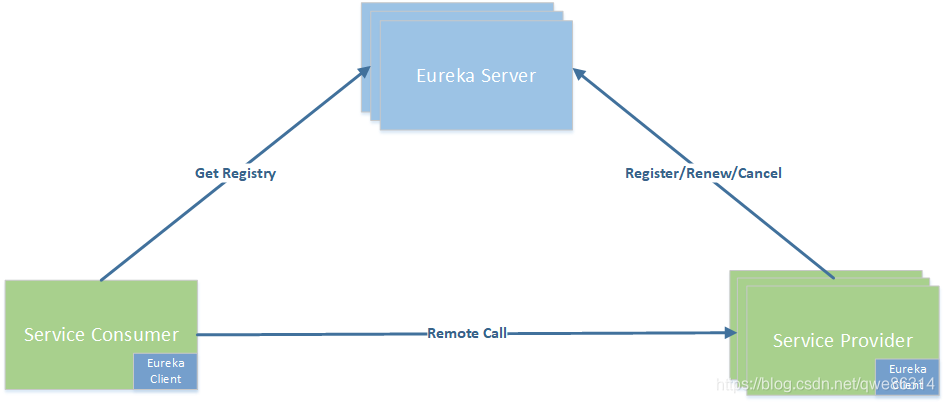
- Eureka包含两个组件:Eureka Server和Eureka Client
- Eureka Server:提供注册服务,各个节点启动后,会在EurekaServer中进行注册
- Eureka Client:是一个java客户端,用于简化交互,将会向Eureka Server发送心跳(默认周期为30秒)。如果多个心跳周期内没有接收到某个节点的心跳,Eureka Server将会从服务注册表中将这个服务节点移除掉(默认周期为90秒)
三大角色
- Eureka Server:提供服务的注册与发现
- Service Provider:将自身服务注册到Eureka中,从而使消费方能够找到
- Service Consumer:服务消费方从Eureka中获取注册服务列表,从而找到消费服务
5.3、创建一个注册中心
新建一个模块
springcloud-eureka-7001导入依赖
spring-cloud-starter-eureka-server1.4.6<!-- spring-cloud-starter-eureka-server --> <dependency> <groupId>org.springframework.cloud</groupId> <artifactId>spring-cloud-starter-eureka-server</artifactId> <version>1.4.6.RELEASE</version> </dependency> <!-- 热部署工具 --> <dependency> <groupId>org.springframework.boot</groupId> <artifactId>spring-boot-devtools</artifactId> </dependency>编写配置文件
# 配置端口号
server:
  port: 7001

# Eureka配置
eureka:
  instance:
    hostname: localhost  # Eureka服务端的实例名称
  client:
    register-with-eureka: false # 表示是否向Eureka注册中心注册自己
    fetch-registry: false # 为false表示自己为注册中心
    service-url:  # 监控页面
      defaultZone: http://${ eureka.instance.hostname} :${ server.port} /eureka/
编写主启动类,
EurekaServer_7001开启功能 @EnableXXX@SpringBootApplication @EnableEurekaServer public class EurekaServer_7001 { public static void main(String[] args) { SpringApplication.run(EurekaServer_7001.class, args); } }启动测试,可以访问到Eureka的默认页面
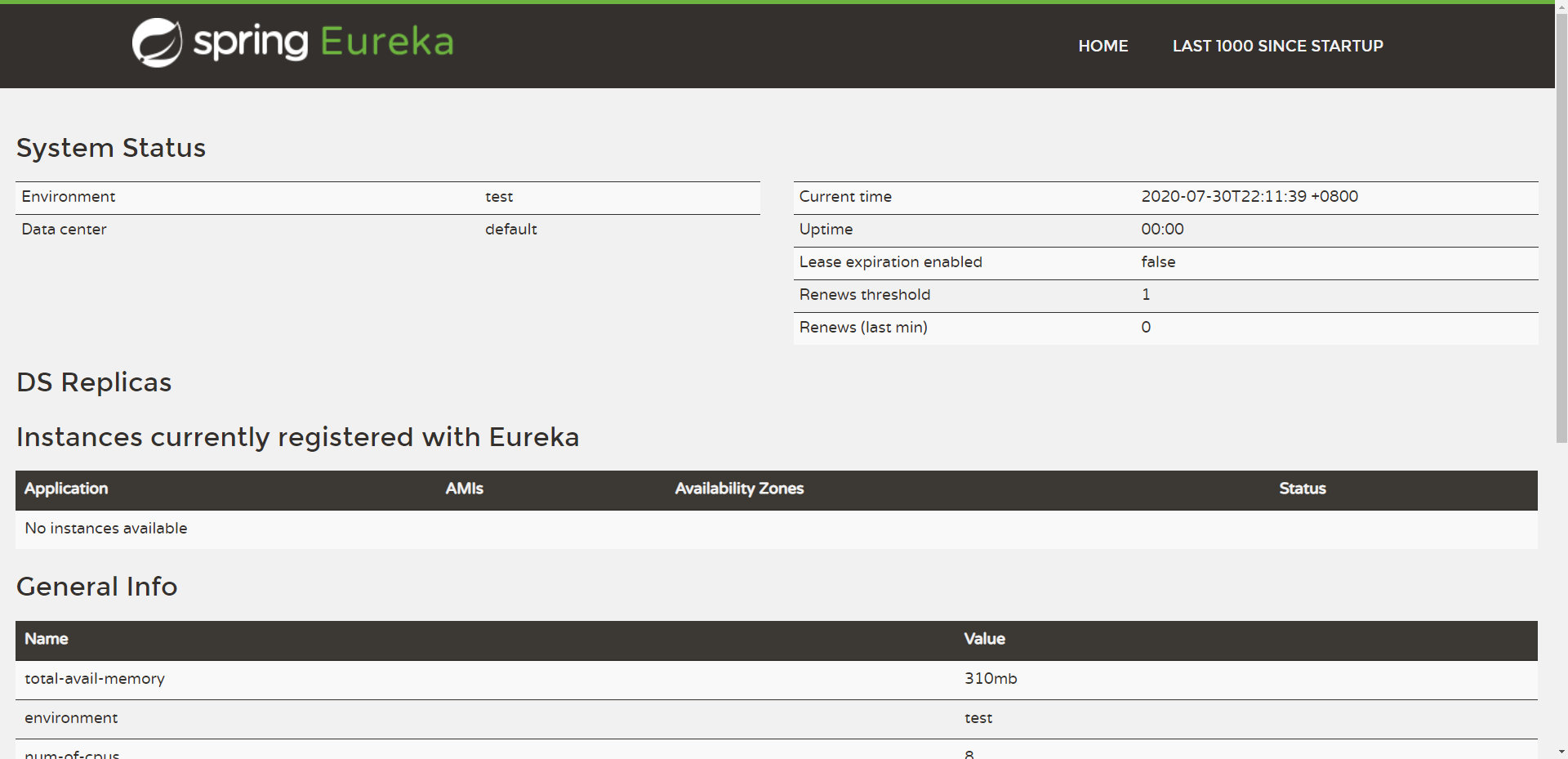
5.4、进行注册
在
8001项目中增加Eureka的maven依赖,导入spring-cloud-startter-eureka<!-- spring-cloud-starter-eureka --> <dependency> <groupId>org.springframework.cloud</groupId> <artifactId>spring-cloud-starter-eureka</artifactId> <version>1.4.6.RELEASE</version> </dependency>编写配置文件
application.yml# Eureka的配置,注册到哪里 eureka: client: service-url: defaultZone: http://localhost:7001/eureka/在主启动类,开启注解支持
@EnableEurekaClient@SpringBootApplication @EnableEurekaClient // 在服务启动后自动注册到Eureka中 public class DeptProvider_8001 { public static void main(String[] args) { SpringApplication.run(DeptProvider_8001.class, args); } }测试:先启动7001项目,然后开启8001
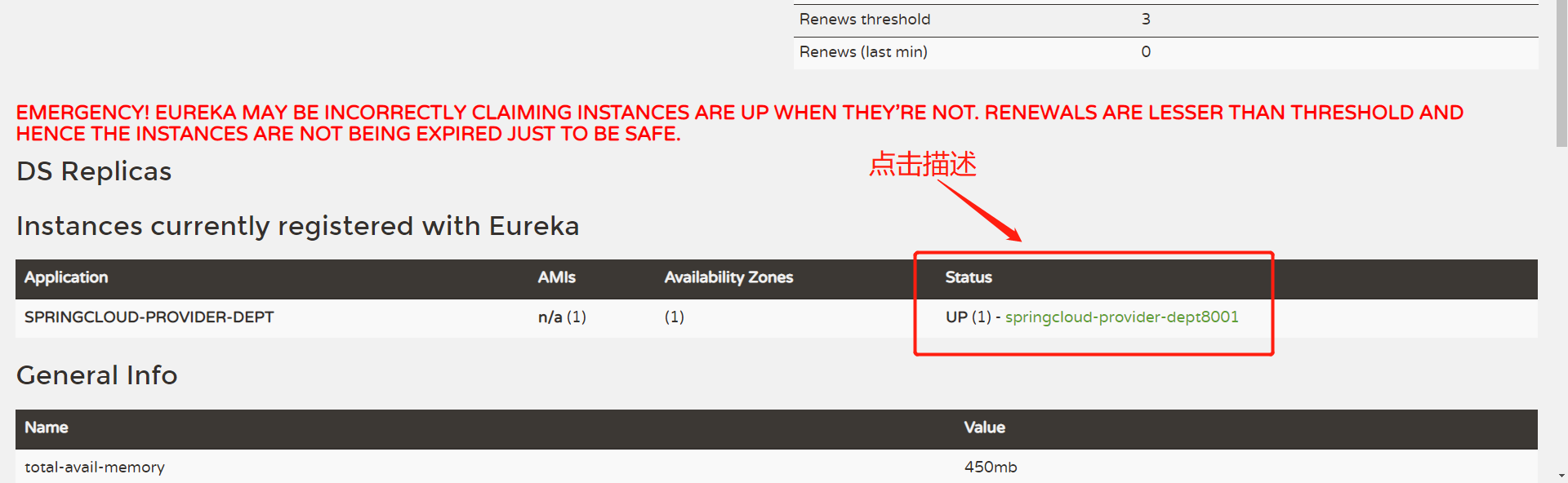
访问页面:
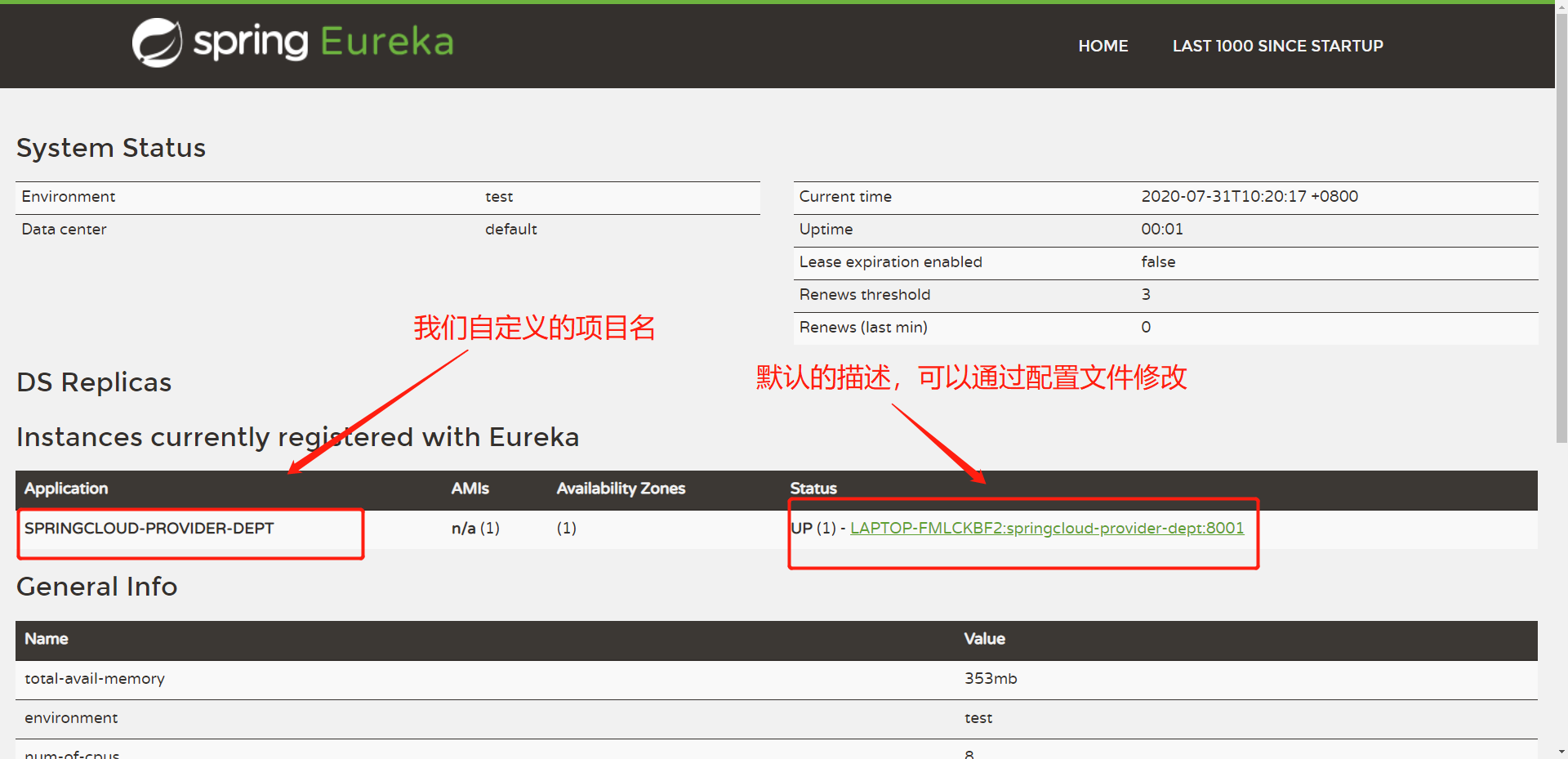
修改项目描述
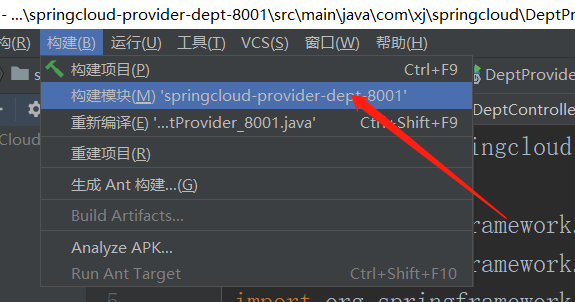
# Eureka的配置,注册到哪里 eureka: client: service-url: defaultZone: http://localhost:7001/eureka/ instance: instance-id: springcloud-provider-dept8001修改之后使用构建进行热部署,可能会出来下图警告,再次点击重建即可。
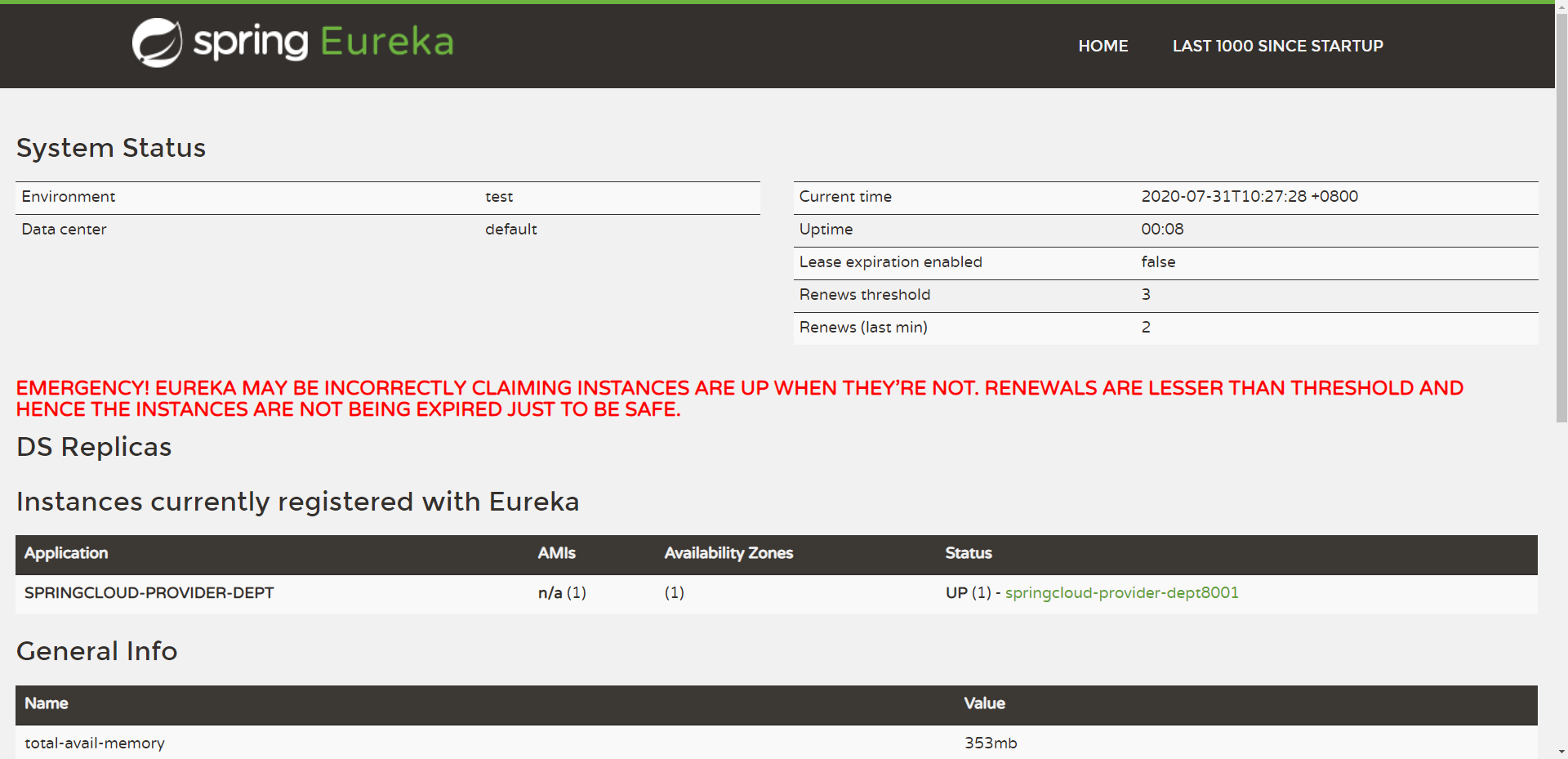
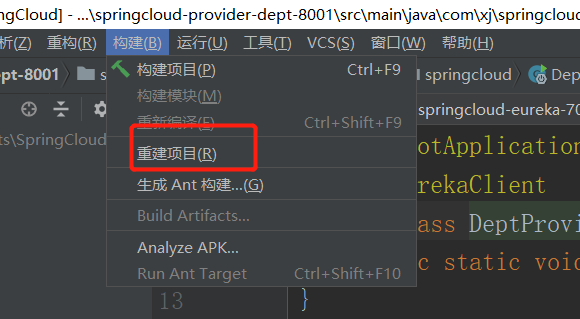
部署完之后会发现描述已经修改

修改点击描述之后的页面内容
继续在
8001项目中导入依赖spring-boot-starter-actuator<!--actuator完善监控信息--> <dependency> <groupId>org.springframework.boot</groupId> <artifactId>spring-boot-starter-actuator</artifactId> </dependency>添加配置
# info配置 info: app.name: xj-springcloud company.name: lxjblog.gitee.io重新启动8001进行测试
会跳转显示我们刚才配置的信息

然后就是上面那个爆红的问题
- 这是Eureka的自我保护机制
- 某时刻某一微服务不可以使用了(就像刚才将8001项目停止),eureka不会立即清理,依旧会对该服务的信息进行保存,即仍然可以看到8001项目的信息,但是点进去描述网站会报错。【当一个服务崩了就会触发】
- 这是微服务的心跳连接,当超过90秒的时候就会出现上面爆红的情况,当接收的心跳数恢复到阈值以上时,该节点就会自动退出自我保护机制,然后红字会保留一段时间才恢复
- Eureka架构宁可同时保留所有的微服务,也不盲目注销任何健康的微服务
- 在springcloud中,可以使用
eureka.server.enable-self-preservation = false禁用自我保护机制【不推荐关闭】
对注册进来的微服务,获取信息
编写控制类,注意不要导错包,是
springframework下的,不然显示无法自动装配// 获取一些配置的信息,得到具体的微服务 @Autowired private DiscoveryClient client; @GetMapping("/dept/discovery") private Object discovery(){ // 获取微服务列表的清单 List<String> services = client.getServices(); System.out.println("discovery==>services" + services); // 得到一个具体的微服务信息,通过id(微服务名称)获取 List<ServiceInstance> instances = client.getInstances("SPRINGCLOUD-PROVIDER-DEPT"); for (ServiceInstance instance : instances){ System.out.println( instance.getHost() + "\t" + instance.getPort() + "\t" + instance.getUri() + "\t" + instance.getInstanceId() + "\t" + instance.getServiceId() + "\t" ); } return this.client; }在主启动类中增加注解
@EnableDiscoveryClient热部署项目测试,只构建8001项目即可,不需要重启7001
测试:访问http://localhost:8001/dept/discovery

同时控制台输出对应的信息
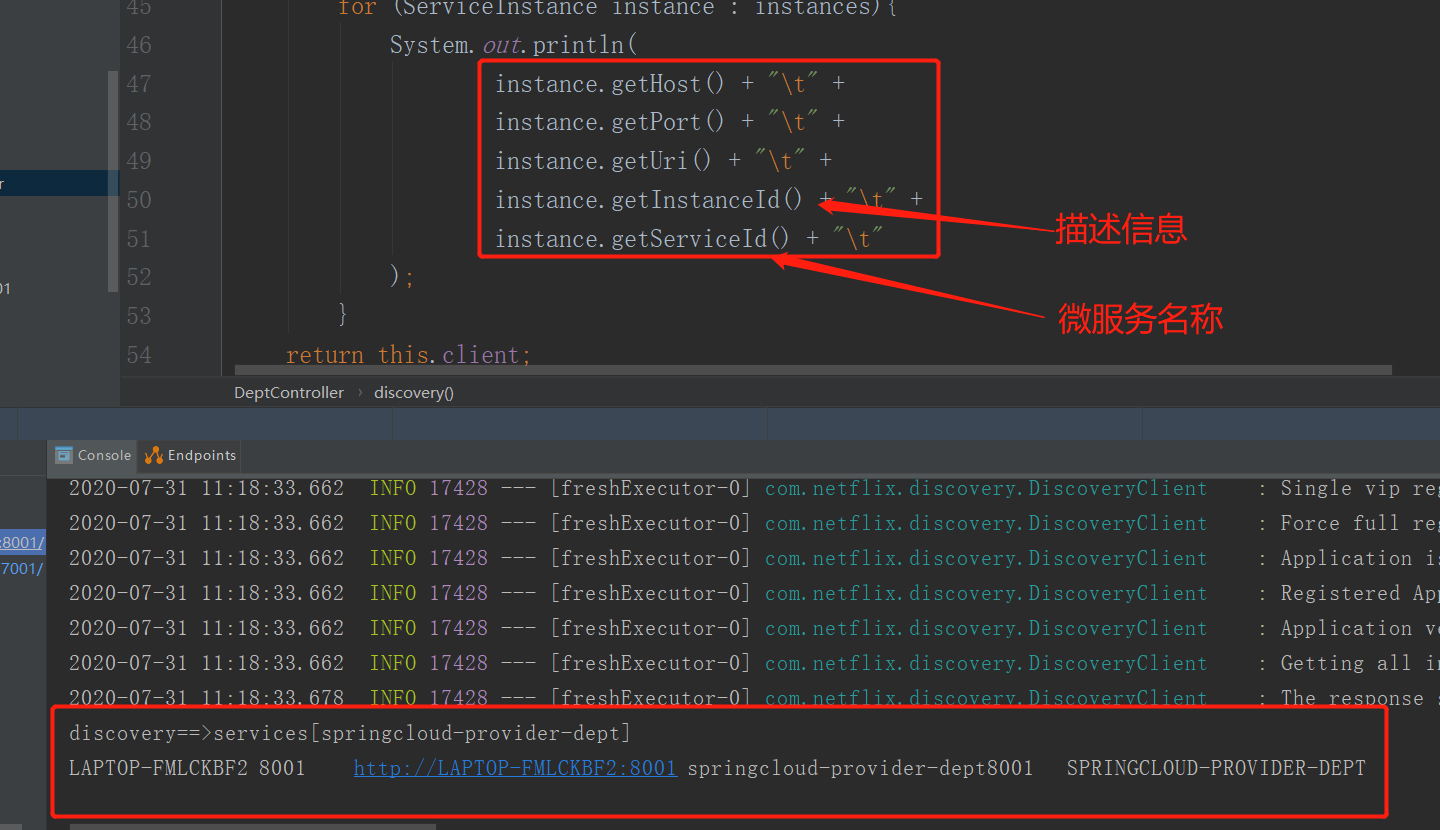
小结:
- 导入Eureka依赖
spring-cloud-starter-eureka - 编写配置信息,即要注册到哪
- 开启注解支持
@EnableEurekaClient,这样就可以把我们的服务注册到Eureka中 - 而通过导入
spring-boot-starter-actuator可以配置描述的信息
5.5、Eureka集群配置
创建两个新模块
springcloud-eureka-7002、springcloud-eureka-7003导入
7001中的依赖,并分别复制配置文件,注意修改端口号配置主启动类
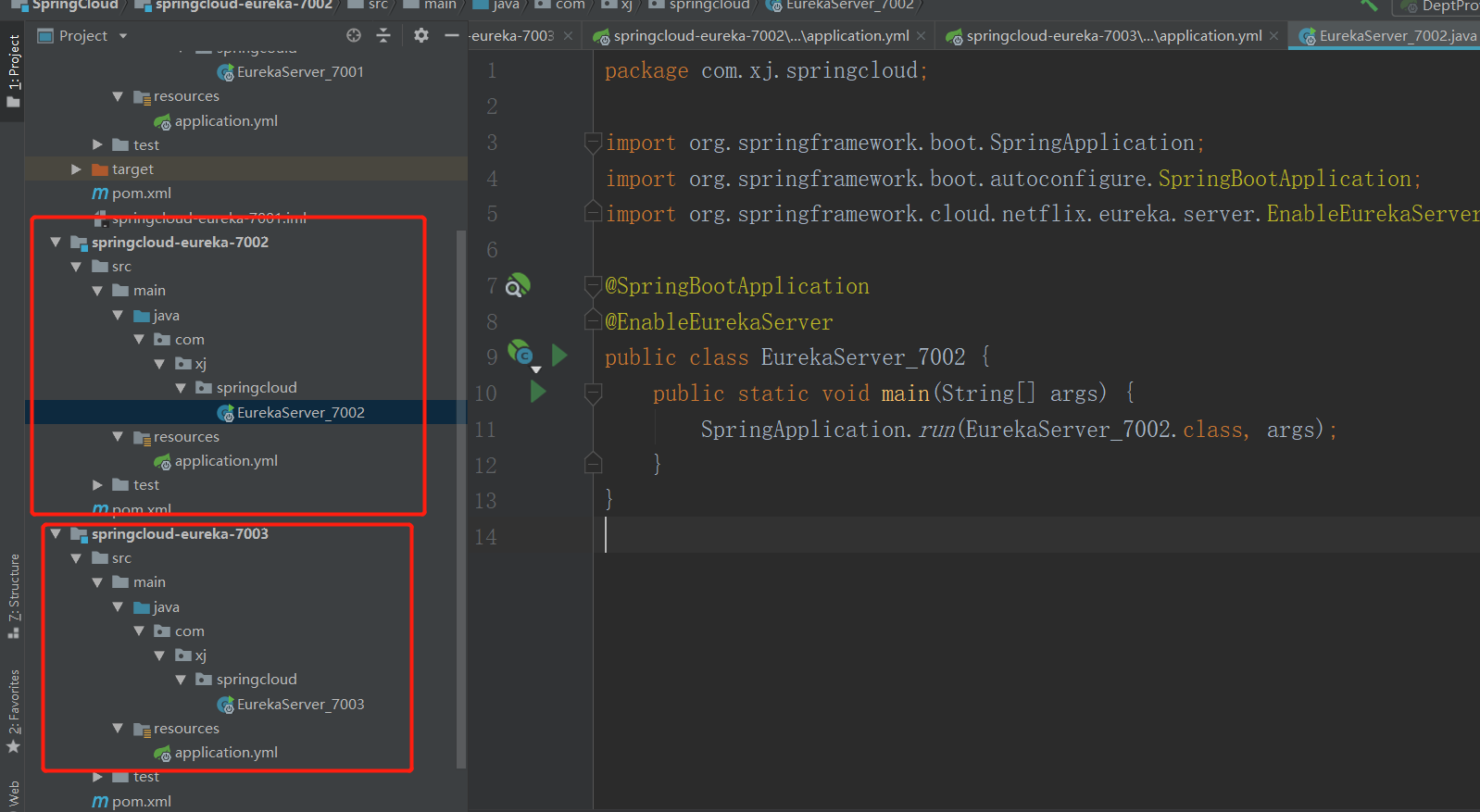
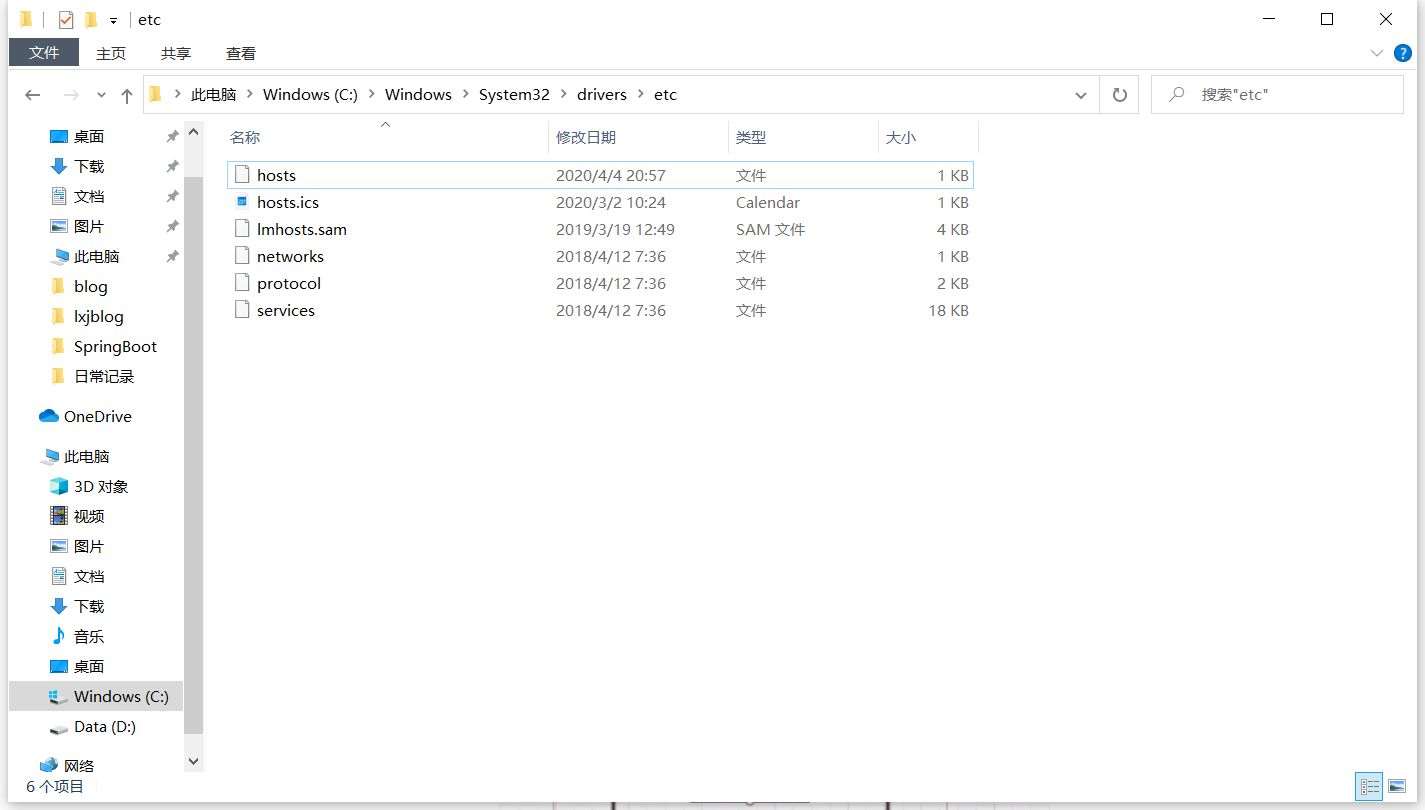
修改本地的端口号映射
打开如下目录:C:\Windows\System32\drivers\etc
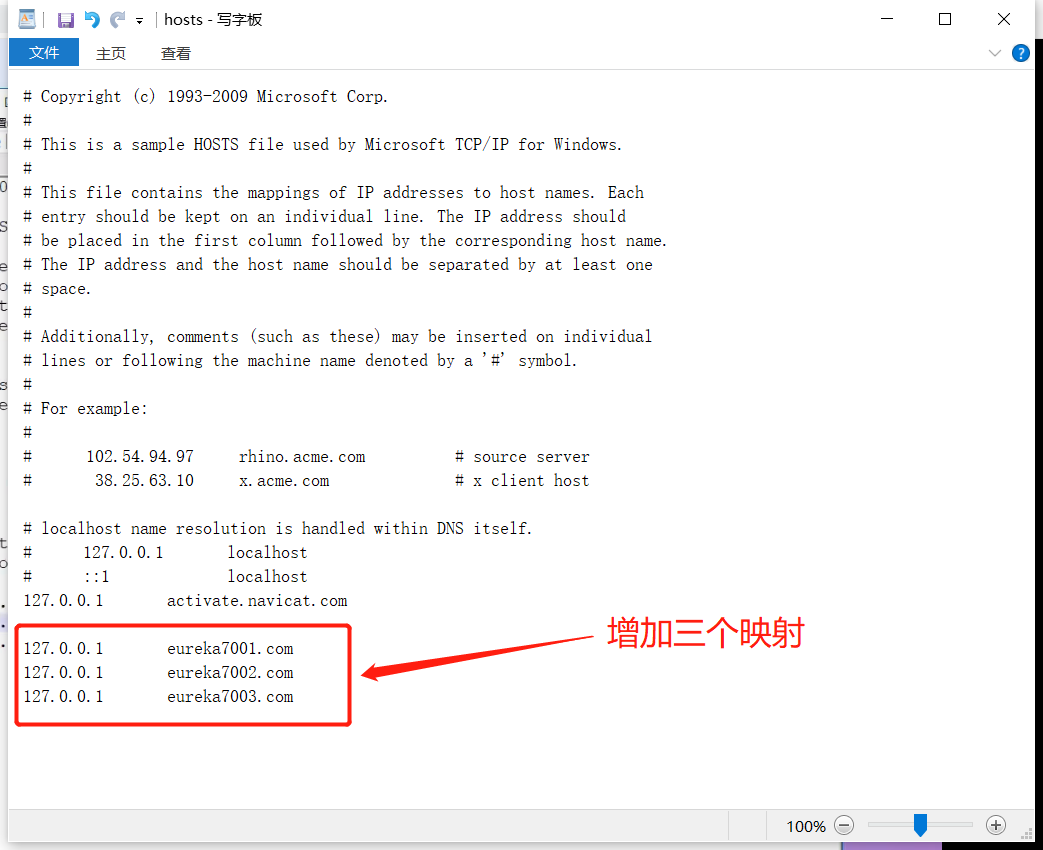
增加映射
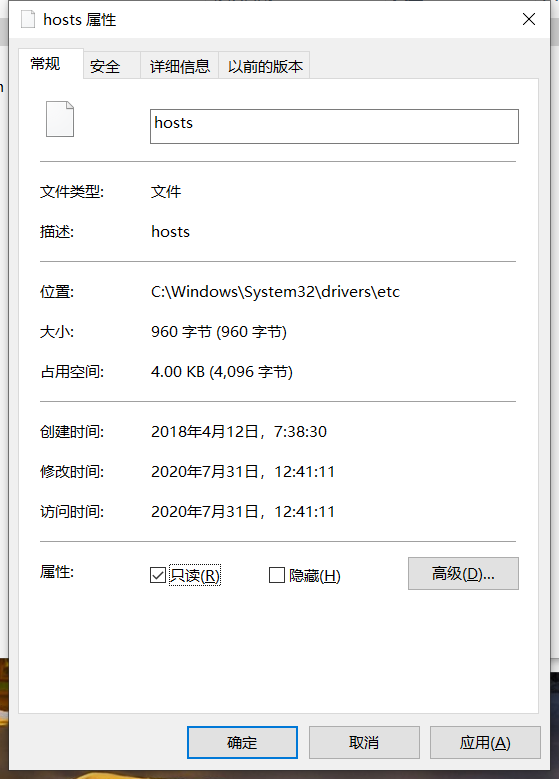
如果无法修改,只要右击hosts ==> 属性 ==> 去掉“只读”属性即可
此时会弹出提示,点击允许操作即可

分别修改配置文件,现在不再是关联自己,而是分别关联其他两个注册中心
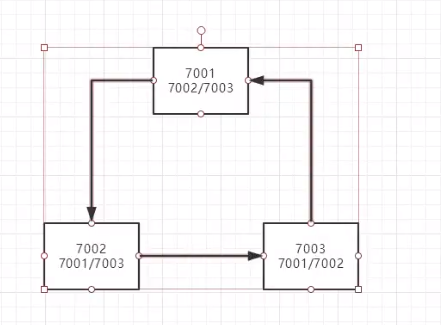
# 配置端口号 server: port: 7001 # Eureka配置 eureka: instance: hostname: eureka7001.com # Eureka服务端的实例名称 client: register-with-eureka: false # 表示是否向Eureka注册中心注册自己 fetch-registry: false # 为false表示自己为注册中心 service-url: # 监控页面 # 单机:defaultZone: http://${ eureka.instance.hostname} :${ server.port} /eureka/ # 集群(关联其他的注册中心) defaultZone: http://eureka7002.com:7002/eureka/,http://eureka7003.com:7003/eureka/其他两个配置文件以此类推,分别进行关联
修改
8001的配置文件,注册到上面的3个注册中心中# Eureka的配置,注册到哪里 eureka: client: service-url: defaultZone: http://localhost:7001/eureka/,http://localhost:7002/eureka/,http://localhost:7003/eureka/ instance: instance-id: springcloud-provider-dept8001分别启动3个注册中心,发现每个注册中心都关联起其他两个(点击可进行跳转)
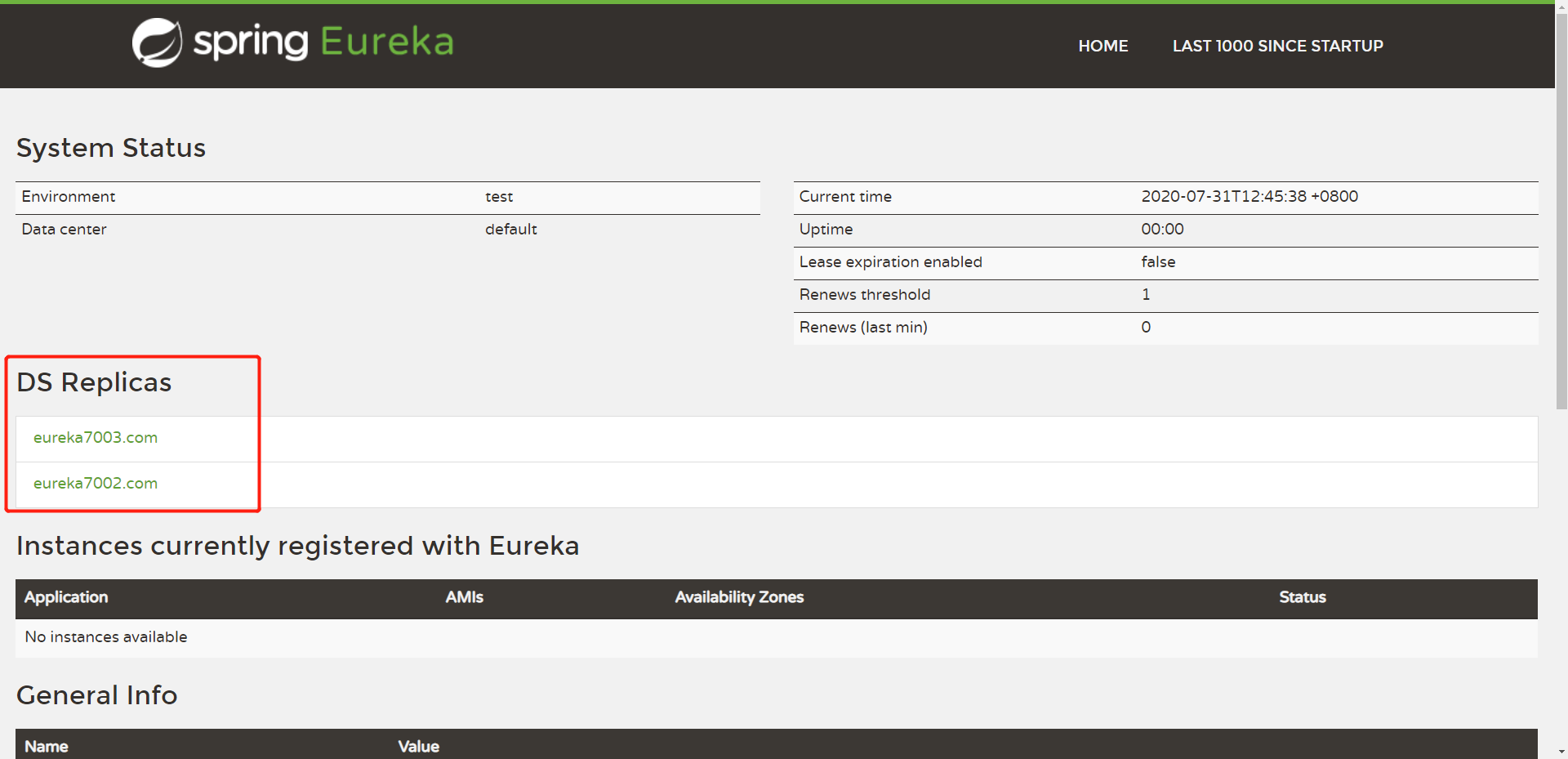
也可以通过我们自定义的映射访问(因为太久没操作,开启了自我保护机制)
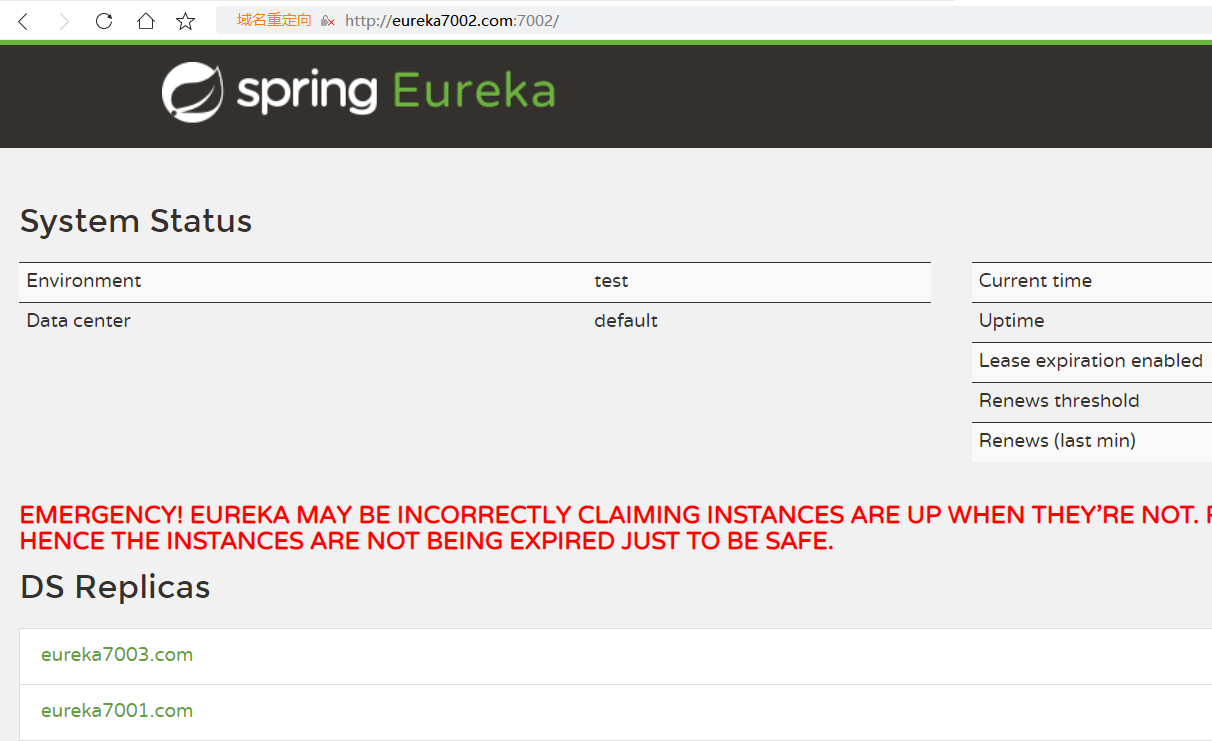
启动
8001项目进行注册,发现该服务成功注册到每个注册中心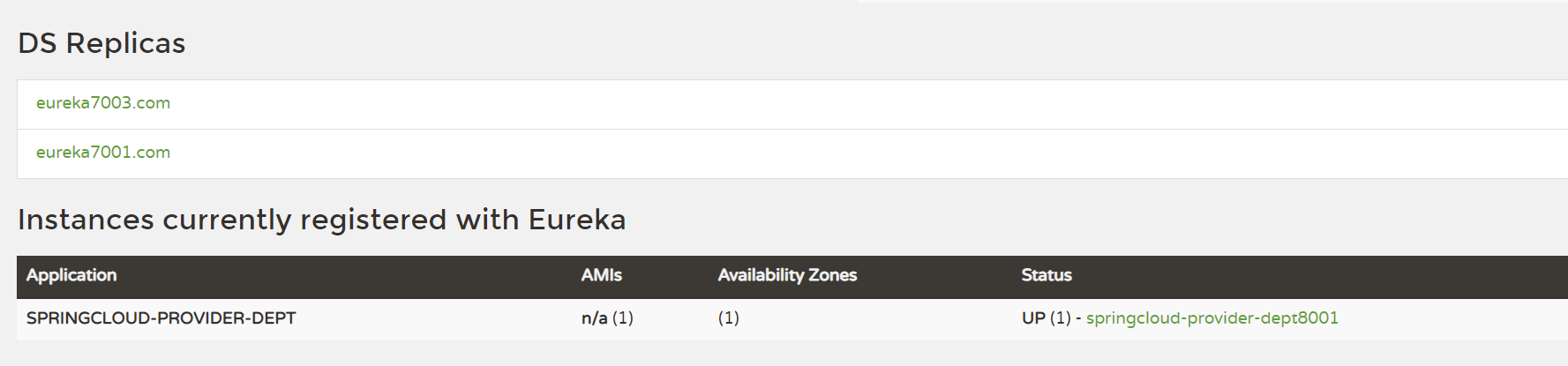
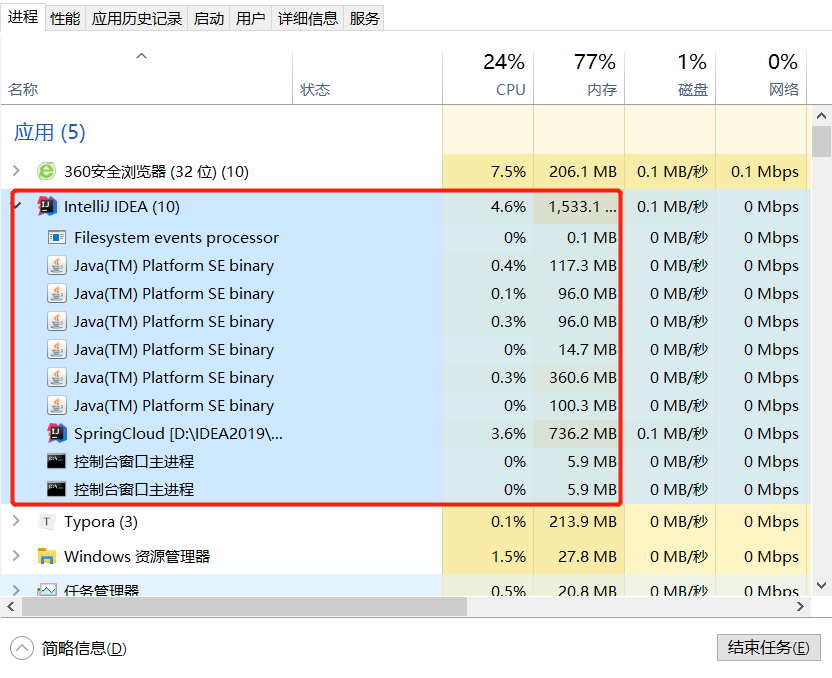
【注意:该过程会比较占用电脑运行内存】
5.6、Eureka与Zookeeper的对比
CAP原则
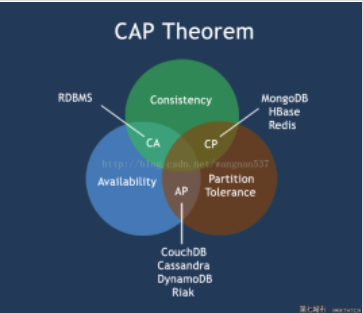
一致性(C):在分布式系统中的所有数据备份,在同一时刻是否同样的值。(等同于所有节点访问同一份最新的数据副本)
可用性(A):在集群中一部分节点故障后,集群整体是否还能响应客户端的读写请求。(对数据更新具备高可用性)
分区容错性(P):以实际效果而言,分区相当于对通信的时限要求。系统如果不能在时限内达成数据一致性,就意味着发生了分区的情况,必须就当前操作在C和A之间做出选择。
CAP原则的精髓就是要么AP,要么CP,要么AC,但是不存在CAP。
Eureka与Zookeeper对比
著名的CAP理论指出:一个分布式系统不可能同时满足C(一致性)、A(可用性)、p(容错性)。由于分区容错性P在分布式系统中是必须要保证的,因此我们只能在A和C之间进行权衡。
- Zookeeper保证的是CP;
- Eureka保证的是AP;
当向注册中心查询服务列表时,我们可以容忍注册中心返回的是几分钟以前的注册信息,但不能接收服务直接down掉不可用。也就是说,服务注册功能对可用性的要求高于一致性。
Zookeeper保证的是CP:
当master主节点因为网络故障与其他节点失去联系的时候,剩余节点将会重新进行leader选举。而问题就在于,重新选择一个master主节点的时间太长,30~120s,且选举期间整个zookeeper集群都是不可用的,这就会导致选举期间注册服务瘫痪。
Eureka保证的是AP:
Eureka基于可用性的一点,所以各个节点都是平等的,几个节点挂掉不会影响正常节点的工作,剩余的节点依旧可以提供注册和查询服务,如果发现连接失败,会自动切换至其他节点。
只要有一台Eureka还在,就能保证注册服务的可用性,只不过查到的信息可能不是最新的。除此之外,Eureka还有一种自我保护机制,如果在15分钟内超过85%的节点都没有正常的心跳,那么Eureka就认为客户端与注册中心出现的网络故障,会出现以下几种情况:
- Eureka不再从注册列表中移除因为长时间没有收到心跳而应该过期的服务
- Eureka依然能够接受新服务的注册和查询请求,但是不会被同步到其他节点(即保证当前节点仍然可用)
- 当网络稳定时,当前实例新的注册信息会被同步到其他节点中
因此Eureka可以很好的应对因网络故障导致部分节点失去联系的情况,而不会像zookeeper那样使整个注册服务瘫痪。
6、Ribbon负载均衡
中文文档:https://www.springcloud.cc/spring-cloud-netflix.html
6.1、Ribbon是什么
Spring Cloud Ribbon是基于Netflix Ribbon实现的一套客户负载均衡的工具
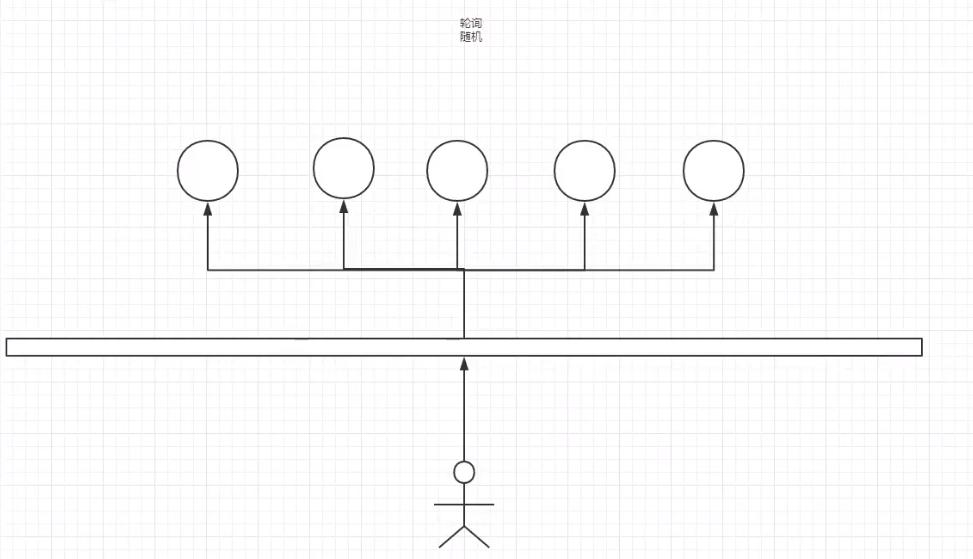
简单来说,Ribbon是Netflix发布的开源项目,主要功能是提供客户端的软件负载均衡算法,将Netflix的中间层服务连接在一起。Ribbon的客户端组件提供一系列完整的配置项如:连接超时、重试等等。简单的说,就是在配置文件中列岀 Load Balancer(简称LB:负载均衡)后面所有的机器, Ribbon会自动的帮助你基于某种规则(如简单轮询,随机连接等等)去连接这些机器。
ribbon能干嘛?
LB,即负载均衡( Load Balance),在微服务或分布式集群中经常用的一种应用
负载均衡简单的说就是将用户的请求平摊的分配到多个服务上,从而达到系统的HA(高可用)。
常见的负载均衡软件有 Nginx,Lvs等等
dubbo、 Spring Cloud中均给我们提供了负载均衡, Spring Cloud的负载均衡算法可以自定义
负载均衡简单分类
集中式LB:即在服务的消费方和提供方之间使用独立的LB设施,如Ngin,由该设施负责把访问请求通过某种策略转发至服务的提供方。
进程式LB:将LB逻辑集成到消费方,消费方从服务注册中心获知有哪些地址可用,然后自己再从这些地址中选出一个合适的服务器。Ribbon就属于进程内LB,它只是一个类库,集成于消费方进程,消费方通过它来获取到服务提供方
6.2、Ribbon集成测试
在
消费者项目中,导入Ribbon依赖<!-- spring-cloud-starter-netflix-ribbon --> <dependency> <groupId>org.springframework.cloud</groupId> <artifactId>spring-cloud-starter-netflix-ribbon</artifactId> <version>1.4.6.RELEASE</version> </dependency>导入eureka依赖
<!-- spring-cloud-starter-eureka --> <dependency> <groupId>org.springframework.cloud</groupId> <artifactId>spring-cloud-starter-eureka</artifactId> <version>1.4.6.RELEASE</version> </dependency>编写配置
# Eureka的配置
eureka:
  client:
    register-with-eureka: false # 不向Eureka中注册自己
    service-url:
      defaultZone: http://eureka7001.com:7001/eureka/,http://eureka7002.com:7002/eureka/,http://eureka7003.com:7003/eureka/
主启动类中增加注解@EnableEurekaClient
@SpringBootApplication
@EnableEurekaClient
public class DeptConsumer_80 {
    public static void main(String[] args) {
        SpringApplication.run(DeptConsumer_80.class, args);
    }
}
编写配置类,配置负载均衡实现类RestTemplate
// Configuration 注解相当于Spring中的applicationContext.xml,然后在里面注册bean
@Configuration
public class ConfigBean {
    @Bean
    @LoadBalanced
    public RestTemplate getRestTemplate(){
        return new RestTemplate();
    }
}
修改控制类
// 这里我们访问的地址应该是一个变量,通过服务名来访问
// private static final String REST_URL_PREFIX = "http://localhost:8001";
private static final String REST_URL_PREFIX = "http://SPRINGCLOUD-PROVIDER-DEPT";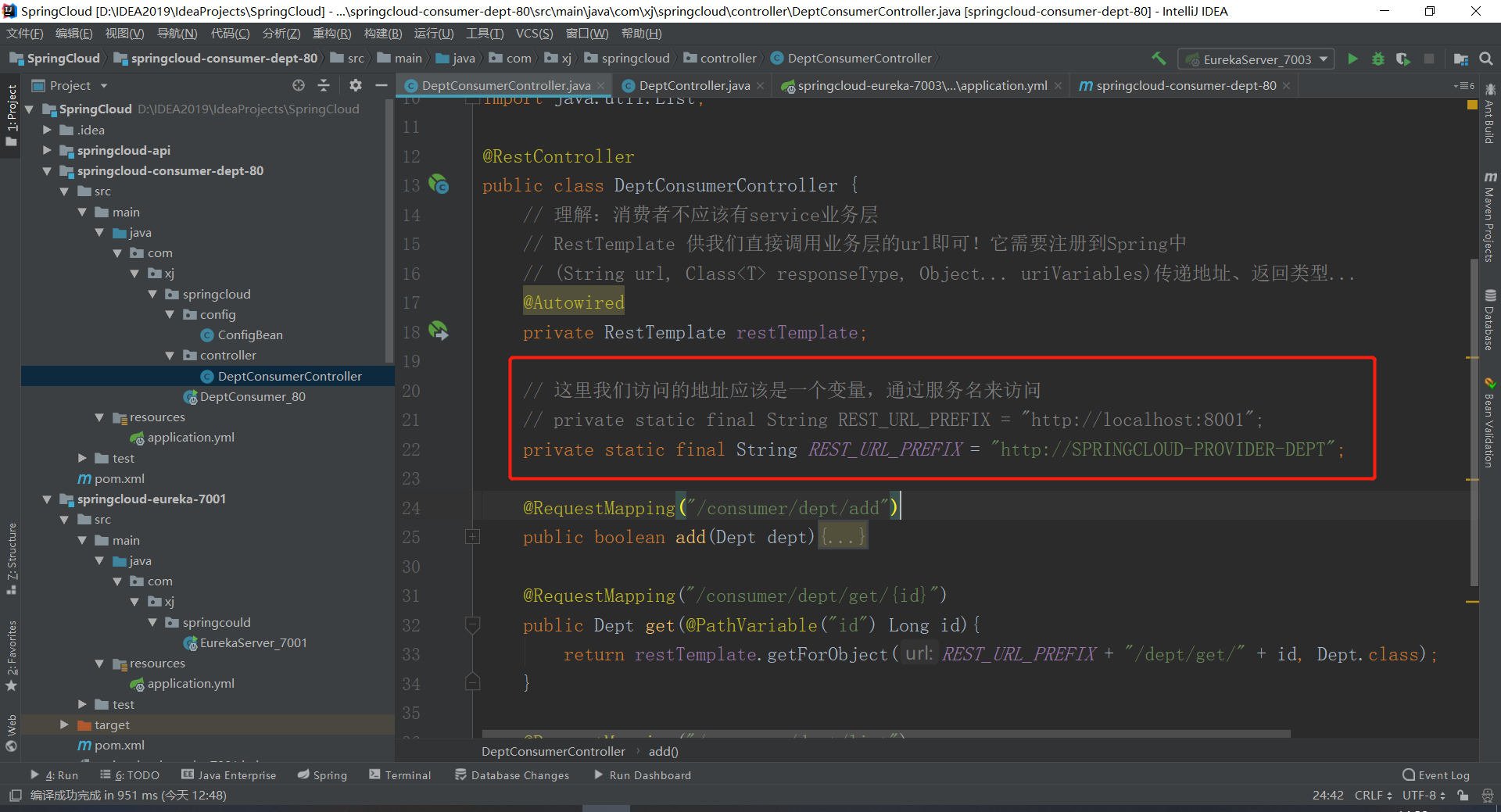
启动测试,开启注册中心 ==> 开启提供者 ==> 开启消费者
访问:http://localhost/consumer/dept/list

消费者可以查询出相应的数据就OK了
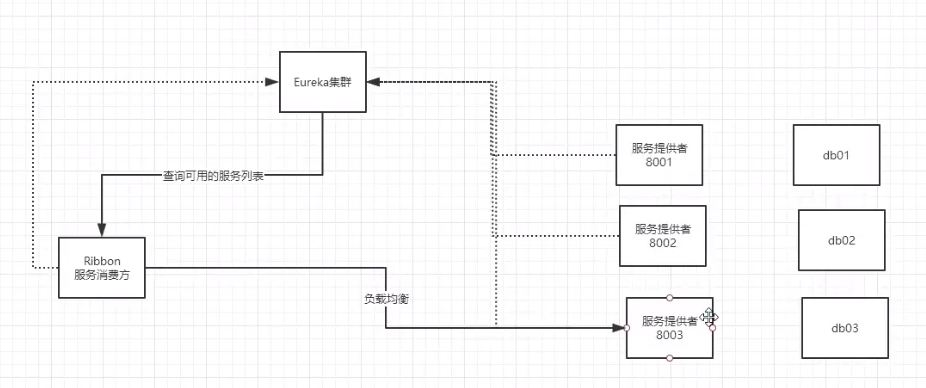
6.3、负载均衡的实现
创建多个相同服务提供者,消费者访问的时候会轮询从3个提供者中查询
创建新的数据库,将
db01数据库进行右击导出备份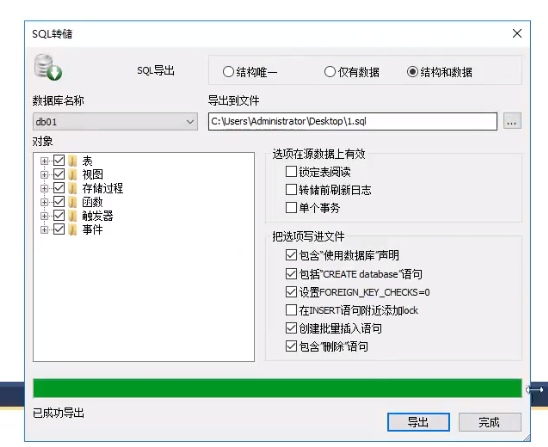
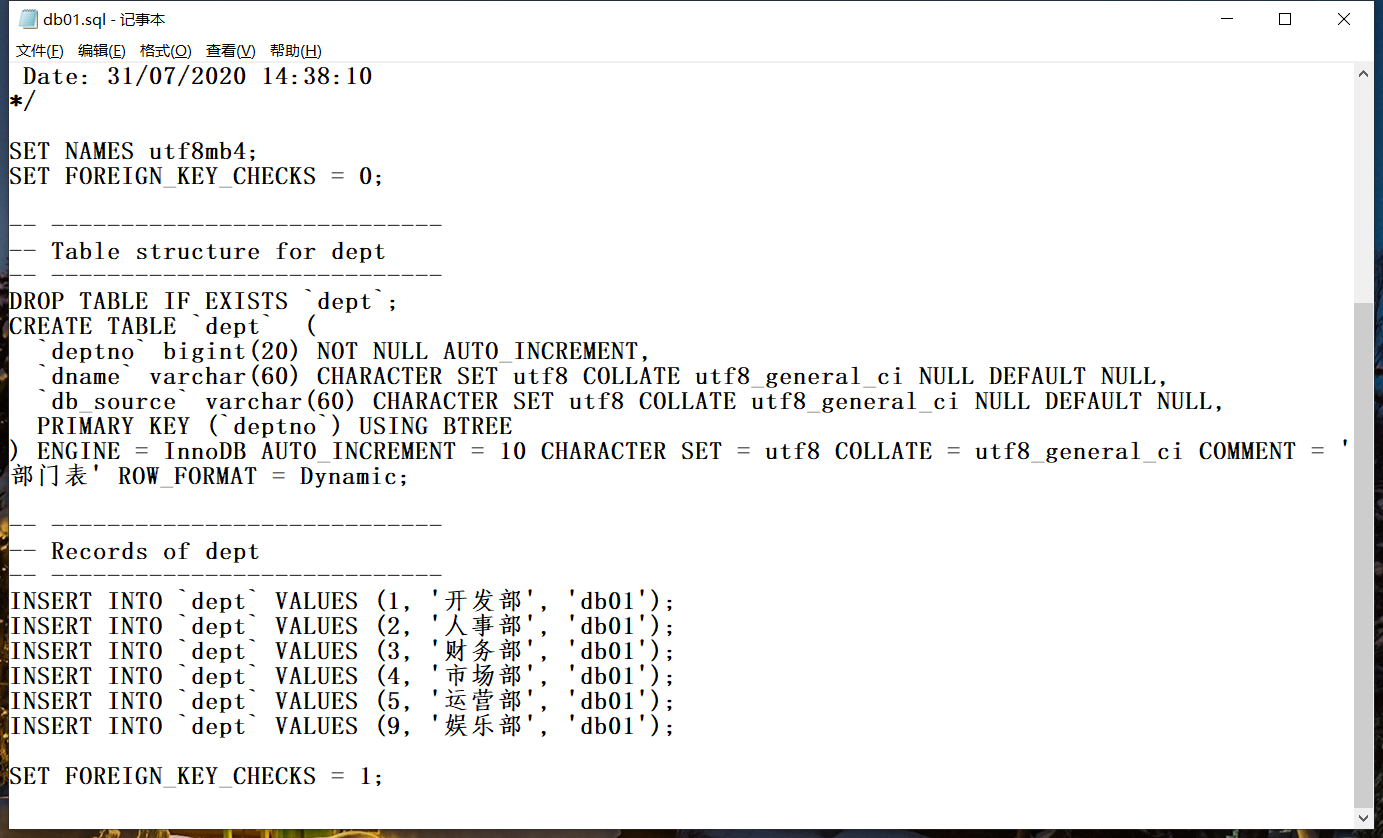
使用指令创建新的数据库,创建
db02和db03项目CREATE DATABASE db02; USE db02; SET NAMES utf8mb4; SET FOREIGN_KEY_CHECKS = 0; -- ---------------------------- -- Table structure for dept -- ---------------------------- DROP TABLE IF EXISTS `dept`; CREATE TABLE `dept` ( `deptno` bigint(20) NOT NULL AUTO_INCREMENT, `dname` varchar(60) CHARACTER SET utf8 COLLATE utf8_general_ci NULL DEFAULT NULL, `db_source` varchar(60) CHARACTER SET utf8 COLLATE utf8_general_ci NULL DEFAULT NULL, PRIMARY KEY (`deptno`) USING BTREE ) ENGINE = InnoDB AUTO_INCREMENT = 1 CHARACTER SET = utf8 COLLATE = utf8_general_ci COMMENT = '部门表' ROW_FORMAT = Dynamic; INSERT INTO `dept`(dname,db_source) VALUES ('开发部',DATABASE()); INSERT INTO `dept`(dname,db_source) VALUES ('人事部',DATABASE()); INSERT INTO `dept`(dname,db_source) VALUES ('财务部',DATABASE()); INSERT INTO `dept`(dname,db_source) VALUES ('市场部',DATABASE()); INSERT INTO `dept`(dname,db_source) VALUES ('运营部',DATABASE()); INSERT INTO `dept`(dname,db_source) VALUES ('娱乐部',DATABASE());在IDEA中导入三个数据库
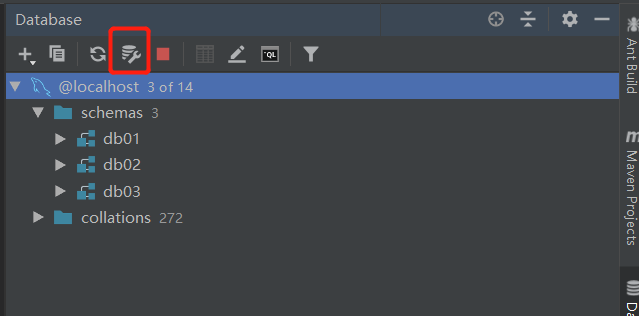
创建新的提供者,
8002、8003拷贝依赖和配置文件
修改配置文件中的端口和数据库名字、描述名称
拷贝mybatis配置文件
拷贝其余的所有文件
只需要修改各自的主启动类即可
所以上面三个提供者只有数据库不同而已
依次启动服务(只需要一个注册中心就行),其中会看到提供者会出现报错,这是因为没有启动所有注册中心,但这并不影响
启动成功之后访问:http://localhost/consumer/dept/get/1
第一次我们访问到的是db02数据库

刷新网页,我们访问到是db03数据库

在刷新就是访问到db01数据库

这就是Ribbon的轮询负载均衡机制
6.4、自定义负载均衡算法
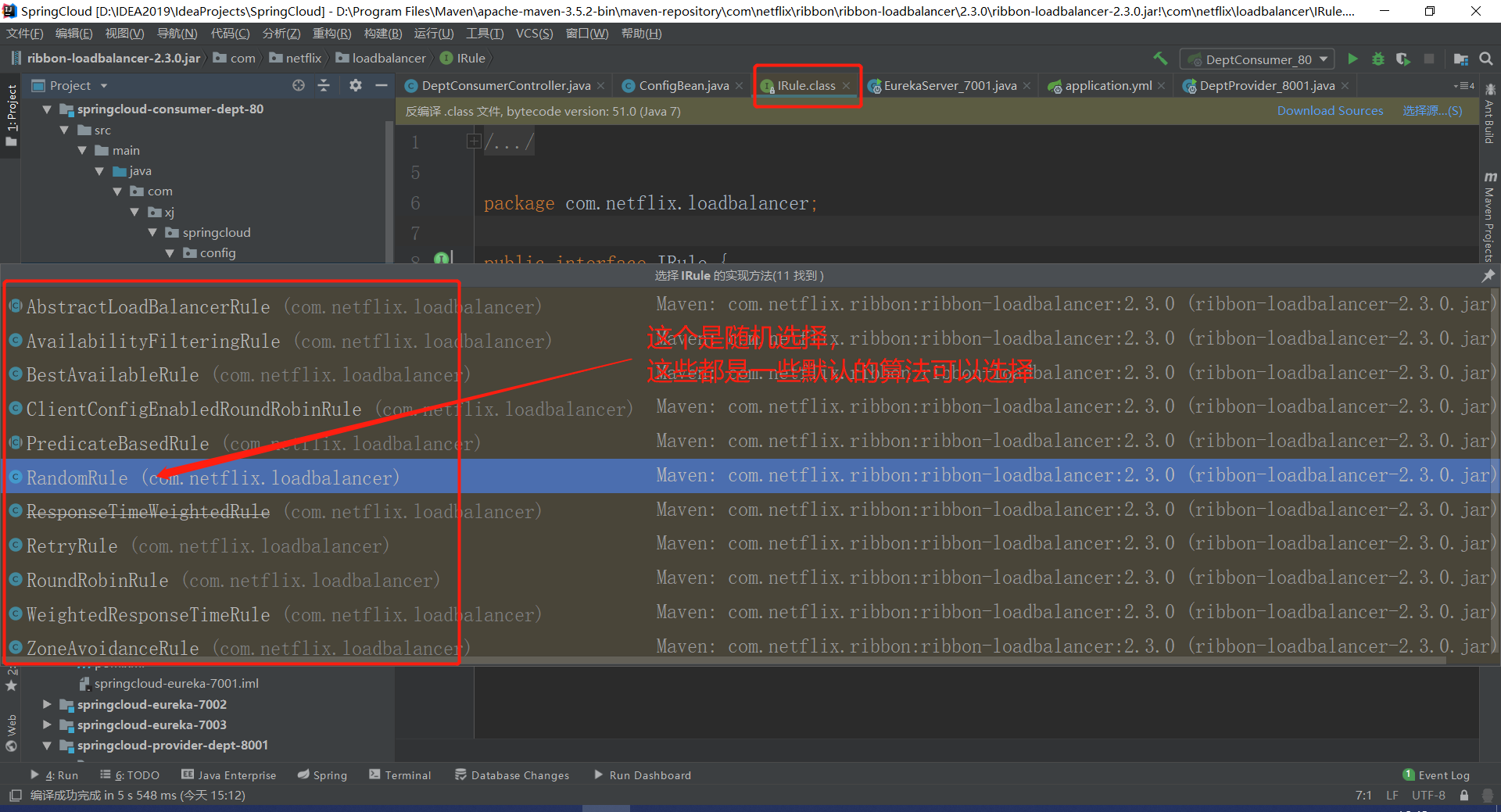
算法查询,进入IRule查看实现的方法
- IRule
- RoundRobonRule:轮询
- RandomRule:随机
- AvailabilityFilteringRule:会先过滤掉,跳闸,访问故障的服务,对剩下的进行轮询
- RetryRule:会先按照轮询获得服务,如果服务获取失败,则会在指定的时间内进行重试
自定义Ribbon,通过在主启动类中添加注解配置
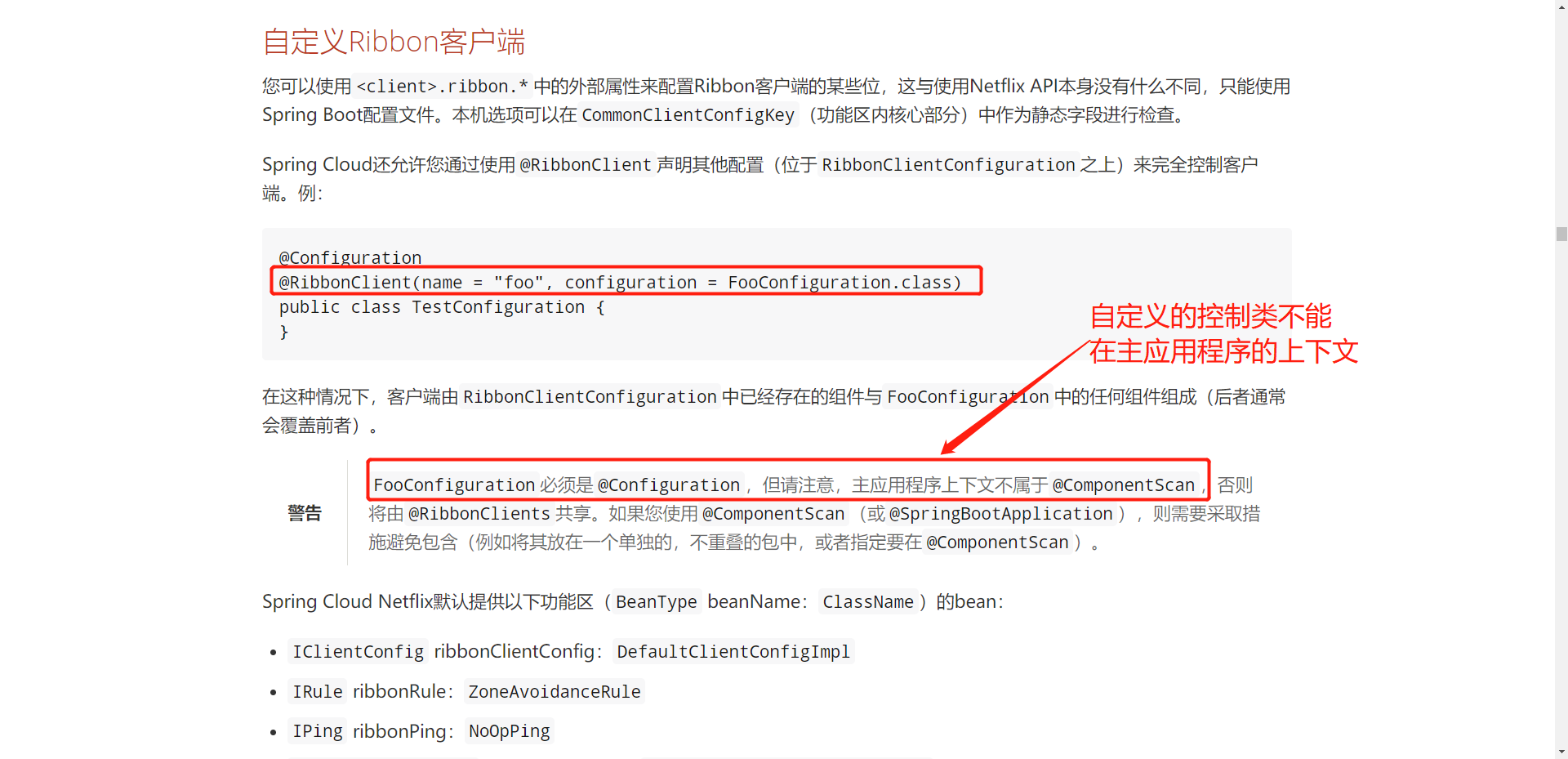
注意:需要采取措施避免包含(例如将其放在一个单独的,不重叠的包中,或者指定要在
@ComponentScan)所以我们需要在
springcloud同级目录下创建我们自己的查询算法!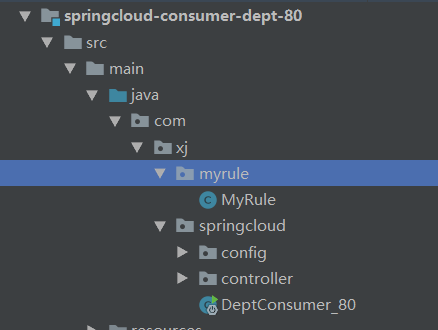
创建控制类,修改查询算法
@Configuration
public class MyRule {
    @Bean
    public IRule iRule(){
        // 先使用默认的随机查询进行测试
        return new RandomRule();
    }
}
修改完之后要在主启动类中进行注解配置
name为我们应用程序的名称,configuration是我们自定义的查询控制类@SpringBootApplication @EnableEurekaClient @RibbonClient(name = "SPRINGCLOUD-PROVIDER-DEPT", configuration = MyRule.class) public class DeptConsumer_80 { public static void main(String[] args) { SpringApplication.run(DeptConsumer_80.class, args); } }启动项目进行测试,此时我们的查询算法为随机的

拷贝随机查询的算法代码,创建我们自己的算法:每个服务获取3次数据,然后切换到下一个服务
package com.xj.myrule;

import com.netflix.client.config.IClientConfig;
import com.netflix.loadbalancer.AbstractLoadBalancerRule;
import com.netflix.loadbalancer.ILoadBalancer;
import com.netflix.loadbalancer.Server;

import java.util.List;
import java.util.concurrent.ThreadLocalRandom;

public class MyRandomRule extends AbstractLoadBalancerRule {

    // 我们自定义:每个服务获取3次数据,然后切换到下一个服务
    // total为访问的次数,currentIndex为哪一个服务
    private int total = 0;
    private int currentIndex = 0;

    //@edu.umd.cs.findbugs.annotations.SuppressWarnings(value = "RCN_REDUNDANT_NULLCHECK_OF_NULL_VALUE")
    public Server choose(ILoadBalancer lb, Object key) {
        if (lb == null) {
            return null;
        }
        Server server = null;

        while (server == null) {

            if (Thread.interrupted()) {
                // 服务中断
                return null;
            }
            List<Server> upList = lb.getReachableServers(); // 获取活着的服务列表
            List<Server> allList = lb.getAllServers();  // 获取所有的服务列表

            int serverCount = allList.size();
            if (serverCount == 0) {
                // 没有服务就退出
                return null;
            }
            // 默认的随机算法
            // int index = chooseRandomInt(serverCount);   // 获得随机的字数
            // server = upList.get(index); // 从活着的服务中随机获取一个服务

            // 自定义算法
            // =========================================================
            if(total < 2){   // 这里2次加上下方的1次,就为3次切换服务
                server = upList.get(currentIndex);
                total++;
            } else {
                total = 0;
                currentIndex++;
                if(currentIndex >= upList.size()){
                    currentIndex = 0;
                }
                server = upList.get(currentIndex);
            }
            // =========================================================

            if (server == null) {
                Thread.yield();
                continue;
            }

            if (server.isAlive()) {
                return (server);
            }

            server = null;
            Thread.yield();
        }

        return server;

    }

    protected int chooseRandomInt(int serverCount) {
        return ThreadLocalRandom.current().nextInt(serverCount);
    }

    @Override
    public Server choose(Object key) {
        return choose(getLoadBalancer(), key);
    }

    @Override
    public void initWithNiwsConfig(IClientConfig clientConfig) {
        // TODO Auto-generated method stub

    }
}
创建好算法之后,我们需要在控制类中调用我们的算法
@Configuration
public class MyRule {
    @Bean
    public IRule iRule(){
        return new MyRandomRule();
    }
}
重启
消费者项目进行测试,发现只要刷新3次就会改变服务
7、Feign接口编程
7.1、简介
feign[feɪn]是声明式的web service客户端,它让微服务之间调用变得更简单了,类似controller调用service。SpringCloud集成了Ribbon和Eureka,可以使用Frign时提供负载均衡的http客户端。
只需要创建一个接口,然后添加注解即可!符合面向接口编程。
调用微服务访问两种方法
- 微服务名字【ribbon】
- 接口和注解【feign】
Feign能干嘛
- Feign旨在编写Java Http客户端变得更容易
- 在使用上,我们只需要创建一个接口并使用注解的方式来配置它,类似于之前在
mapper接口上编注Mapper注解,现在时一个微服务接口上面标注一个Feign注解即可。
Feign集成了Ribbon
- 而不同的是,通过Feign只需要定义服务绑定接口且以声明式的方法,优雅而简单的实现了服务的调用
7.2、Feign使用步骤
创建新模块
springcloud-consumer-dept-feign(也是作为消费者)拷贝
80项目的内容到当前项目再导入feign的依赖
<!-- spring-cloud-starter-feign -->
<dependency>
    <groupId>org.springframework.cloud</groupId>
    <artifactId>spring-cloud-starter-feign</artifactId>
    <version>1.4.6.RELEASE</version>
</dependency>
在
springcloud-api项目中也导入feign的依赖创建
service目录,编写业务类DeptService,让所有的服务可以使用。@FeignClient(value = "SPRINGCLOUD-PROVIDER-DEPT") // 关联到我们的服务类 @Component // 交给Spring托管 public interface DeptService { @PostMapping("/dept/add") public boolean add(Dept dept); @GetMapping("/dept/get/{ id} ") public Dept get(Long id); @GetMapping("/dept/list") public List<Dept> list(); }修改
springcloud-consumer-dept-feign项目的控制类代码,使得更加类似于我们的一般写法,调用接口实现数据库操作。@RestController public class DeptConsumerController { // 获得业务类接口 @Autowired private DeptService service; @RequestMapping("/consumer/dept/add") public boolean add(Dept dept){ return service.addDept(dept); } @RequestMapping("/consumer/dept/get/{ id} ") public Dept get(@PathVariable("id") Long id){ return service.getDept(id); } @RequestMapping("/consumer/dept/list") public List<Dept> list(){ return service.queryAll(); } }在主启动类中启动Feign
@SpringBootApplication
@EnableEurekaClient
@EnableFeignClients(basePackages = { "com.xj.springcloud"} )
public class DeptConsumer_feign {
    public static void main(String[] args) {
        SpringApplication.run(DeptConsumer_feign.class, args);
    }
}
测试:访问成功

小结:
- 我们需要在
api和消费者项目中增加Feign依赖 - 在
api项目中创建业务类接口,关联服务名,并交给Spring托管(即添加两个注解)而接口代码与提供者中的控制类代码相同,但不需要实现体(即在方法上添加XXXMapper注解)。 - 然后在
消费者项目中自动装配业务类接口,并调用方法,最后在主启动类中启动Feign注解@EnableFeignClients(basePackages = { "com.xj.springcloud"} )
总之,Feign使我们的代码可以使用业务类进行数据操作,属于面向接口的编程,同时Feign使我们在原有的代码基础上多加了一层(业务层),使得代码的可读性提高了,但也降低了我们服务的性能(毕竟代码量增多了)
8、Hystrix保护机制
Hystrix [hɪst'rɪks],中文含义是豪猪,因其背上长满棘刺,从而拥有了自我保护的能力。本文所说的Hystrix是Netflix开源的一款容错框架,同样具有自我保护能力。为了实现容错和自我保护。
分布系统面临的问题
复杂分布式体系结构中的应用程序有数十个依赖关系,每个依赖关系在某些时候将不可避免的失败!
服务雪崩
多个微服务之间调用的时候,假设微服务A调用微服务B和微服务C,微服务B和微服务C又调用其他的微服务,这就是所谓的“扇出”、如果扇出的链路上某个微服务的调用响应时间过长或者不可用,对微服务A的调用就会占用越来越多的系统资源,进而引起系统崩溃,所谓的“雪崩效应”。
对于高流量的应用来说,单一的后端依赖可能会导致所有服务器上的所有资源在几秒钟内饱和,比失败更糟糕的是,这些应用程序还可能导致服务之间的延迟增加,备份队列,线程和其他系统资源紧张,导致整个系统发生更多的级联故障,这些都表示需要对故障和延迟进行隔离和管理,以便单个依赖关系的失败,不能取消整个应用程序或系统。
8.1、什么是Hystrix(豪猪)
Hystrix是一个用于处理分布式系统的延迟和容错的开源库,在分布式系统里,许多以来不可避免的会调用失败,比如超时,异常等。Hystrix能够保证在一个依赖出问题的情况下,不会导致整体服务失败,避免级联故障,以提高分布式系统的弹性。
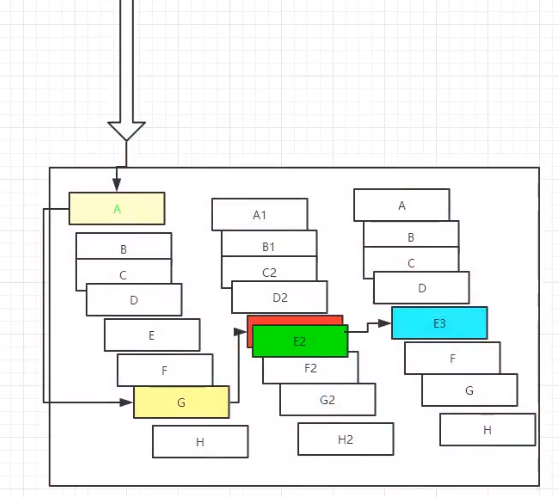
“断路器”本身就是一个开关装置,当某一个服务单元发生故障之后,通过断路器的故障监控(类似熔断保险丝)。向调用方返回一个服务预期的,可处理的备选响应(FallBack),而不是长时间的等待或抛出调用方法无法处理的异常,这样就可以保证服务调用方的线程不会被长时间,不必要的占用,从而避免了故障在分布式系统中的蔓延,乃至雪崩。
能干嘛
服务降级
服务熔断
服务限流
接近实时的监控
……
官网资料:https://github.com/Netflix/Hystrix
8.2、服务熔断
熔断机制是对应雪崩效应的一种微服务链路保护机制
当扇出链路的某个微服务不可用或者响应时间太长时,会进行服务的降级,进而熔断该节点的微服务调用,快速返回错误的响应信息。当检测到该节点微服务调用响应正常后恢复调用链路。在SpringCloud框架里的熔断机制通过Hystrix实现。Hystrix会监控微服务间调用的状况,当失败的调用到一定阈值,缺省5秒内20次调用失败就会启动熔断机制。熔断机制的注解是@HystrixCommand。
测试
创建新模块
springcloud-provider-dept-hystrix-8001拷贝
8001项目到新项目中修改主启动类名称
导入
Hystrix依赖<!-- spring-cloud-starter-hystrix --> <dependency> <groupId>org.springframework.cloud</groupId> <artifactId>spring-cloud-starter-hystrix</artifactId> <version>1.4.6.RELEASE</version> </dependency>编写配置文件,修改Eureka上的描述
编写控制类
public class DeptController {
    @Autowired
    private DeptService deptService;

    @GetMapping("/dept/get/{ id} ")
    @HystrixCommand(fallbackMethod = "hystrixGet")
    public Dept getDept(@PathVariable("id") Long id){
        Dept dept = deptService.queryById(id);
        if (dept == null){
            throw new RuntimeException();
        }
        return dept;
    }
    public Dept hystrixGet(@PathVariable("id") Long id){
        return new Dept()
                .setDeptno(id)
                .setDname("id ==>" + id + "没有对应的信息,null——Hystrix" )
                .setDb_source("no this database in MySQL");
    }

}
开启断路器的支持
@SpringBootApplication
@EnableEurekaClient
@EnableDiscoveryClient
@EnableCircuitBreaker   // 开启熔断机制
public class DeptProviderHystrix_8001 {
    public static void main(String[] args) {
        SpringApplication.run(DeptProviderHystrix_8001.class, args);
    }
}
启动测试,开启
注册中心=》开启刚创建的提供者=》开启消费者(改为了81端口)=》进行错误查询测试
修改配置类(浏览器左下角显示真实的ip)
# Eureka的配置,注册到哪里
eureka:
  client:
    service-url:
      defaultZone: http://eureka7001.com:7001/eureka/,http://eureka7002.com:7002/eureka/,http://eureka7003.com:7003/eureka/
  instance:
    instance-id: springcloud-provider-dept-hystrix-8001
    prefer-ip-address: true # 显示真实的IP地址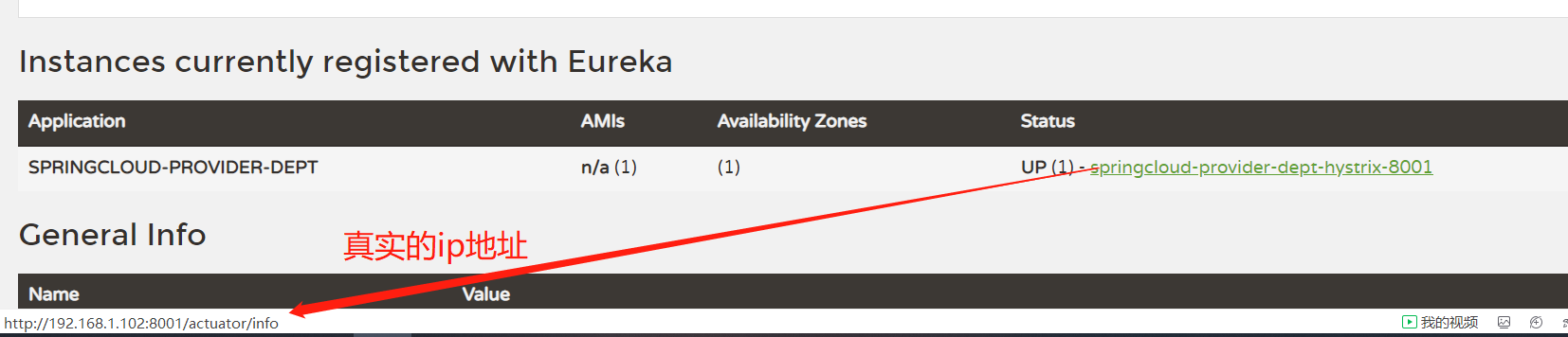
8.3、服务降级
服务降级是在客户端做的操作
为了让A微服务不会崩溃,停用了闲置的服务器,把C的服务终止~所以我们在服务被关闭的时候需要进行相应的提示
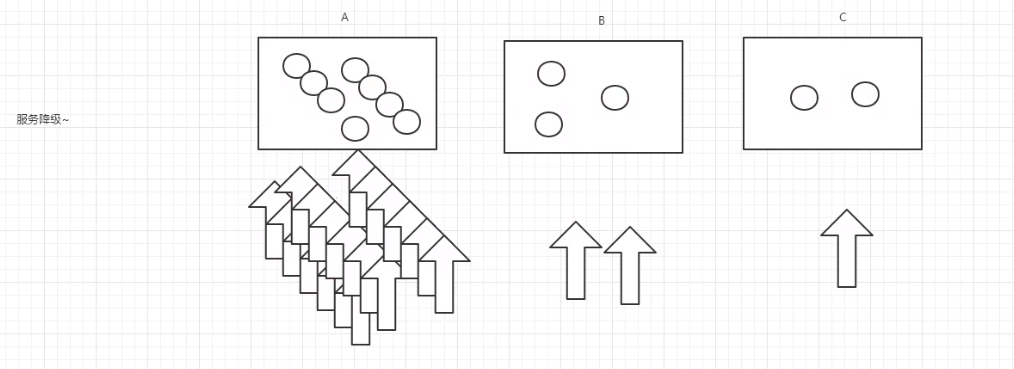
测试:
在
api项目中创建一个业务类DeptServiceFallback@Component public class DeptServiceFallback implements FallbackFactory { @Override public DeptService create(Throwable throwable) { // 返回一个实现了的接口 return new DeptService() { @Override public Dept getDept(Long id) { return new Dept() .setDeptno(id) .setDname("id=>" + id + "没有对应的信息,客户端提供了降级的信息,这个服务现在已经被关闭") .setDb_source("没有数据"); } // 以下方法也可以进行相应的处理 @Override public boolean addDept(Dept dept) { return false; } @Override public List<Dept> queryAll() { return null; } } ; } }在业务类中关联到我们的降级业务,使用
fallbackFactory@FeignClient(value = "SPRINGCLOUD-PROVIDER-DEPT", fallbackFactory = DeptServiceFallback.class) // 关联到我们的服务类 @Component // 交给Spring托管 public interface DeptService { @PostMapping("/dept/add") public boolean addDept(Dept dept); @GetMapping("/dept/get/{ id} ") public Dept getDept(@PathVariable("id") Long id); @GetMapping("/dept/list") public List<Dept> queryAll(); }因为使用的是Feign的支持,所以需要修改
springcloud-consumer-dept-feign的配置文件# Feign配置 feign: hystrix: enabled: true启动测试:
注册中心=》提供者=》feign消费者正常访问

把
提供者关闭测试,显示出我们的降级信息
小结:
在API项目中,创建
处理异常的业务类,实现FallbackFactory接口,返回主要业务的接口并实现在主业务中通过在
@FeignClient注解中添加fallbackFactory属性,关联到异常业务在
消费者项目的配置文件中进行配置,开启feign.hystrix.enabled = true
8.4、Dashboard流监控
创建新模块
springcloud-consumer-hystrix-dashboard导入
消费者的依赖,然后再导入Hystrix依赖,以及Dashboard监控<!-- spring-cloud-starter-hystrix --> <dependency> <groupId>org.springframework.cloud</groupId> <artifactId>spring-cloud-starter-hystrix</artifactId> <version>1.4.6.RELEASE</version> </dependency> <!-- spring-cloud-starter-hystrix-dashboard --> <dependency> <groupId>org.springframework.cloud</groupId> <artifactId>spring-cloud-starter-hystrix-dashboard</artifactId> <version>1.4.6.RELEASE</version> </dependency>编写配置文件
application.yml,编写端口号9001server: port: 9001创建主启动类,增加开启Dashboard注解
@SpringBootApplication
@EnableHystrixDashboard
public class HystrixDashboard9001 {
    public static void main(String[] args) {
        SpringApplication.run(HystrixDashboard9001.class, args);
    }
}
注意:每个
提供者项目都需要有监控的依赖<!--actuator完善监控信息--> <dependency> <groupId>org.springframework.boot</groupId> <artifactId>spring-boot-starter-actuator</artifactId> <version>1.4.6.RELEASE</version> </dependency>启动主启动类测试,进去hystrix页面,可以看到一只豪猪即可
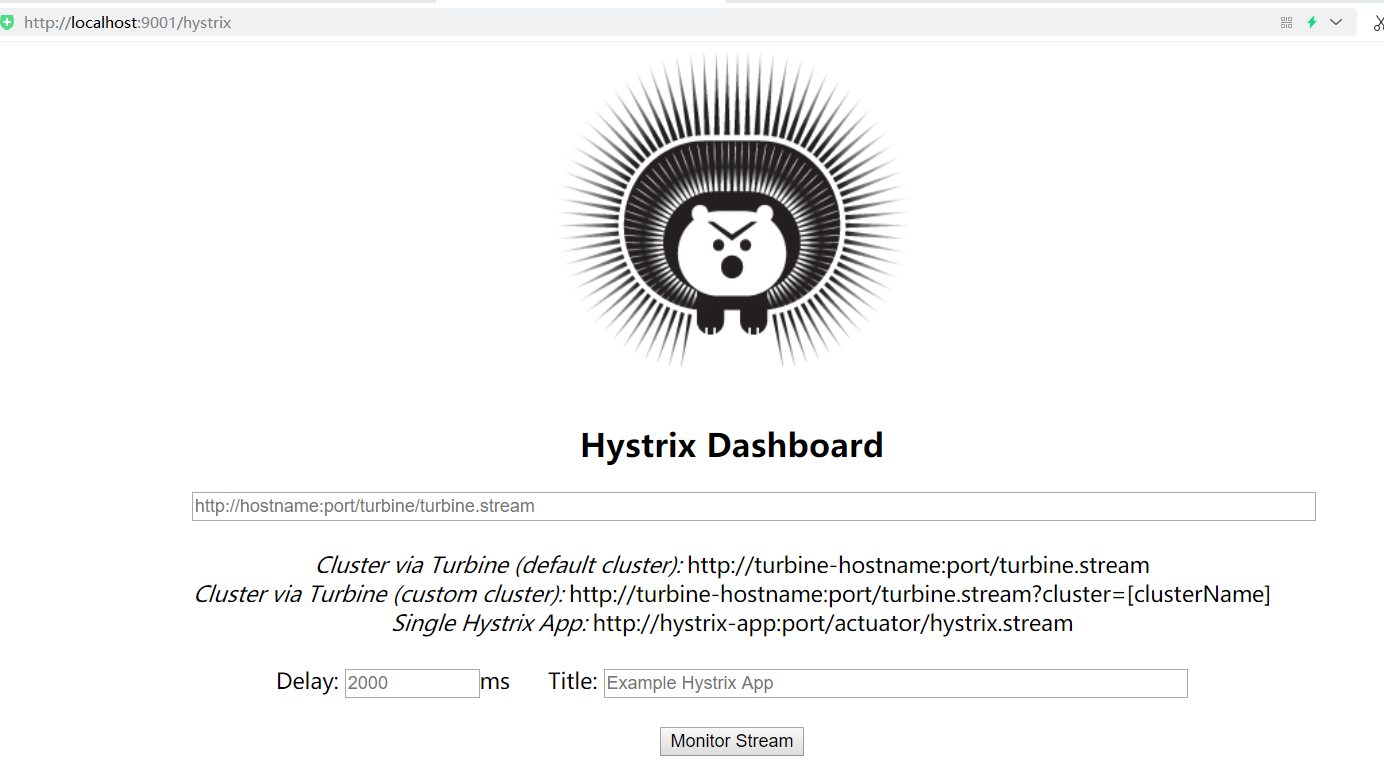
修改
springcloud-provider-dept-hystrix-8001项目,必须是有熔断机制的那个项目!!!【折腾了好久】增加一个Bean进行注册
@SpringBootApplication
@EnableEurekaClient
@EnableDiscoveryClient
@EnableCircuitBreaker   // 开启熔断机制
public class DeptProviderHystrix_8001 {
    public static void main(String[] args) {
        SpringApplication.run(DeptProviderHystrix_8001.class, args);
    }

    // 增加一个Servlet
    @Bean
    public ServletRegistrationBean hystrixMetricsStreamServlet(){
        ServletRegistrationBean registrationBean = new ServletRegistrationBean(new HystrixMetricsStreamServlet());
        registrationBean.addUrlMappings("/actuator/hystrix.stream");
        return registrationBean;
    }
}
启动
7001=> 监控页面9001=>8001进行注册先访问http://localhost:8001/dept/get/1

然后访问http://localhost:8001/actuator/hystrix.stream
可以看到监控出来的一推数据
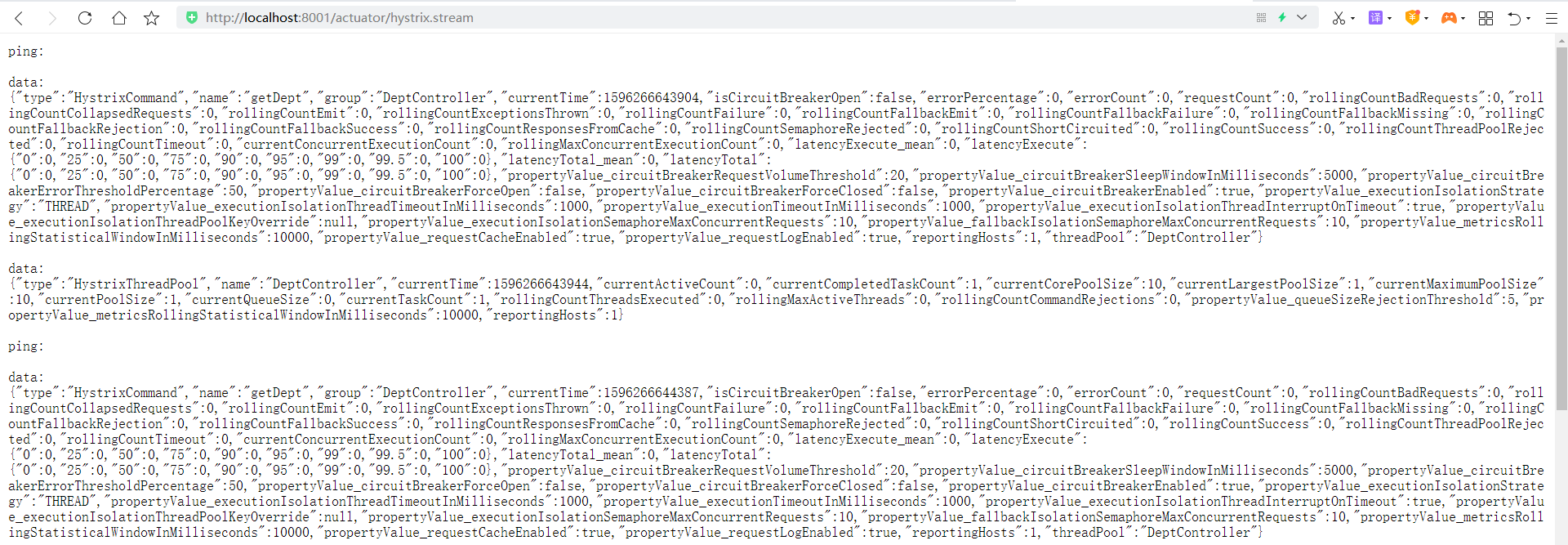
访问:http://localhost:9001/hystrix页面,输入要监控的页面http://localhost:8001/actuator/hystrix.stream
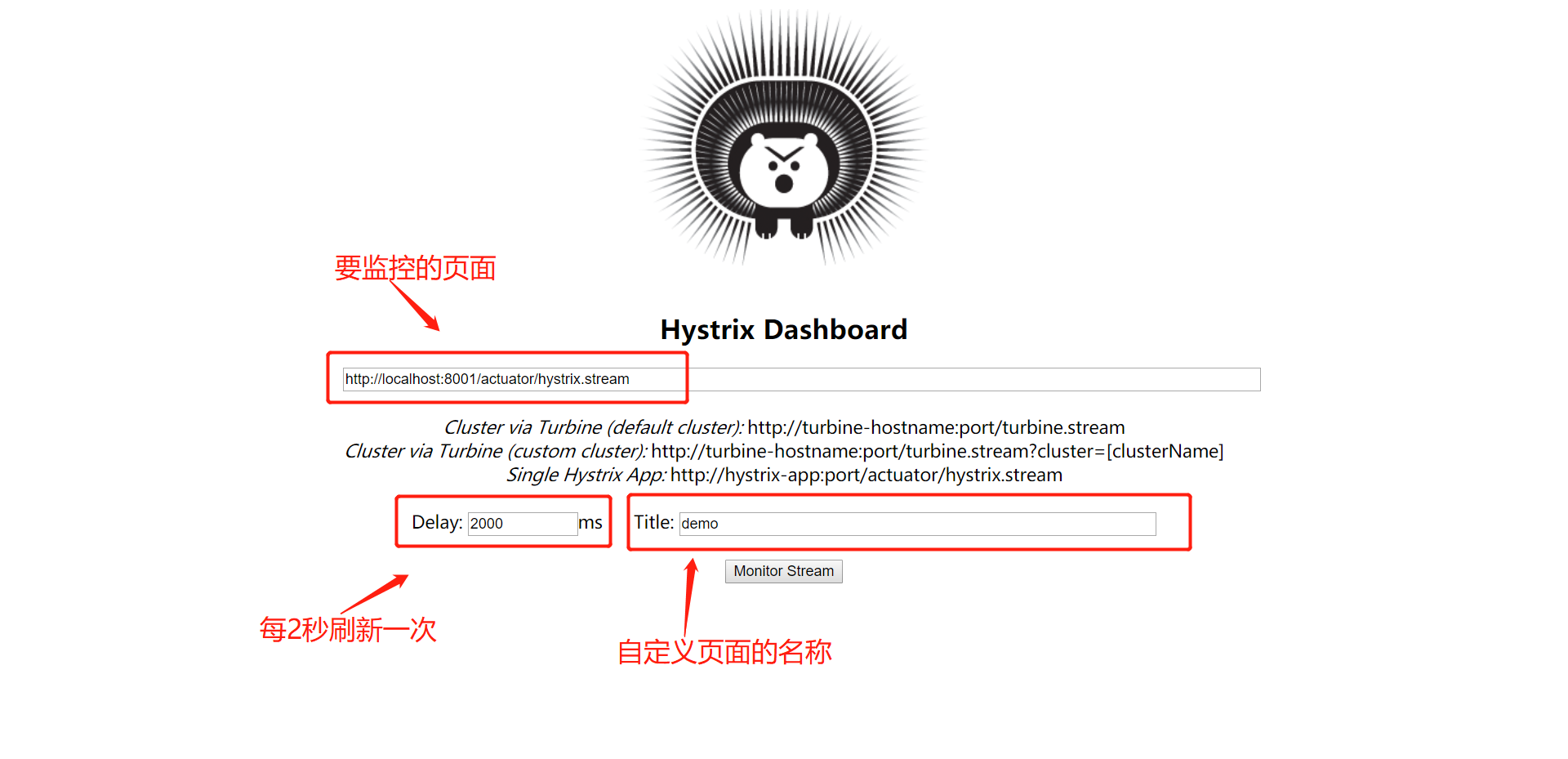
不断刷新我们的访问页面http://localhost:8001/dept/get/1,可以看到里面的实时监控
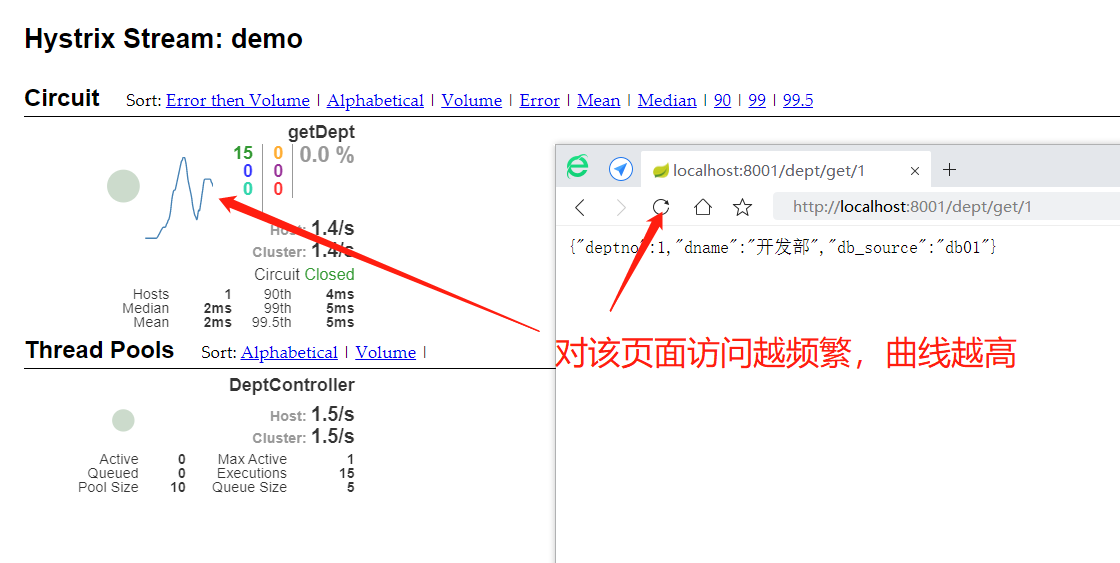
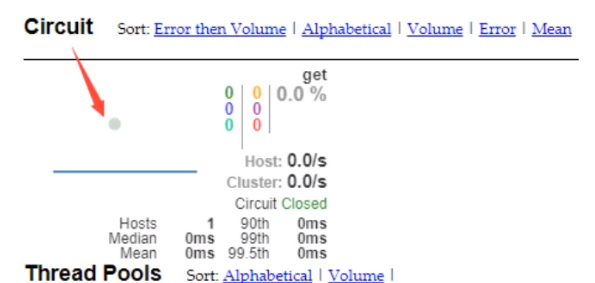
内容含义
一圆
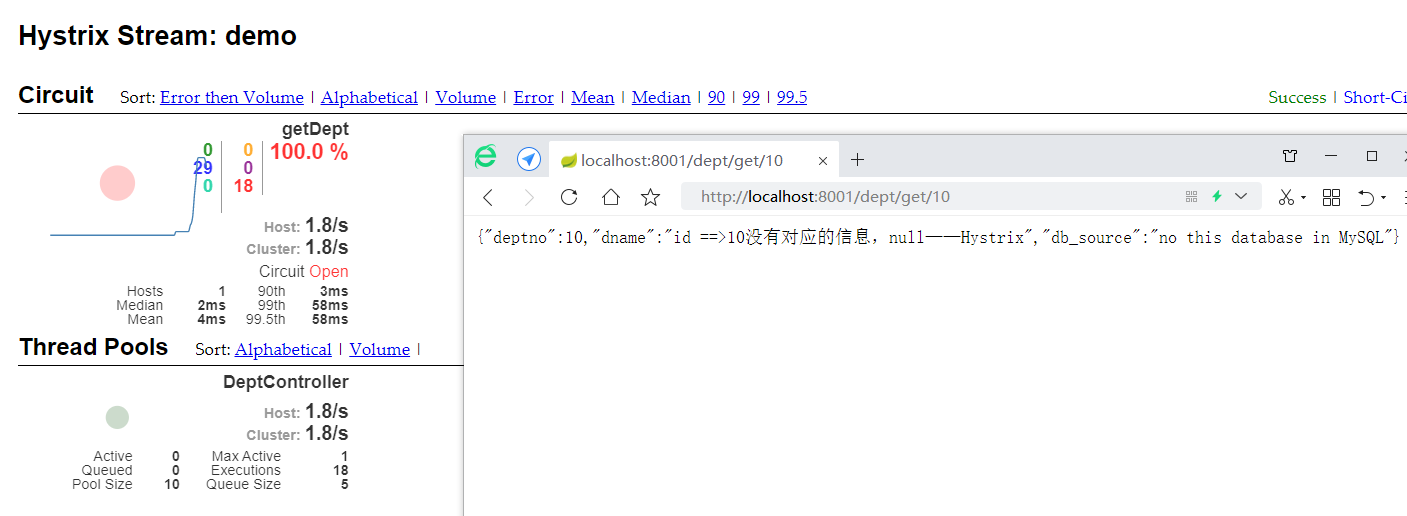
实心圆:总共有两种含义,它通过颜色的变化代表了实例的健康程度
它的健康程度从绿色< 黄色 < 橙色 < 红色 递减
该实心圆除了颜色的变化之外,它的大小也会根据实例的请求流量发生变化,流量越大,该实心圆就越大,所以通过该实心圆的展示,就可以在大量的实例中快速发现故障实例和高压力实例。
比如:当我们一直访问错误的页面的时候,就会变为红色
一线
曲线用来记录2分钟内流量的相对变化,可以通过它来观察到流量的上升和下降趋势!
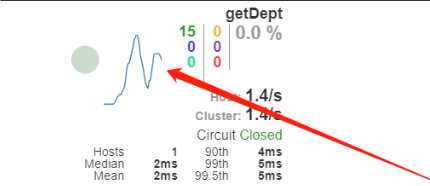
整图说明
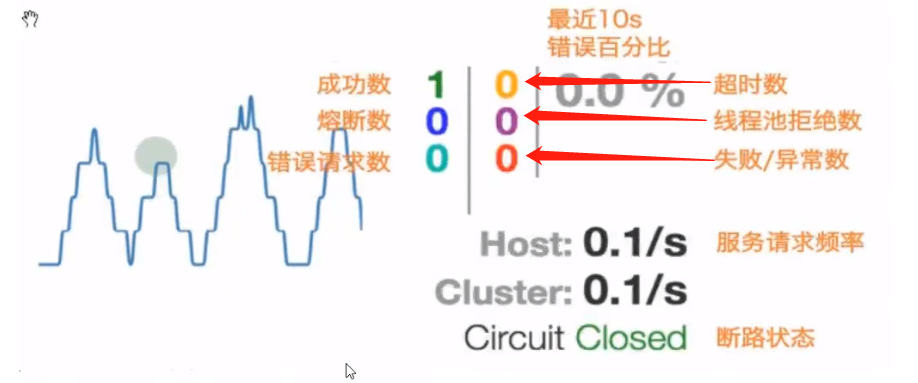
9、Zuul路由网关

9.1、什么是Zuul
官方文档:https://github.com/Netflix/zuul/wiki
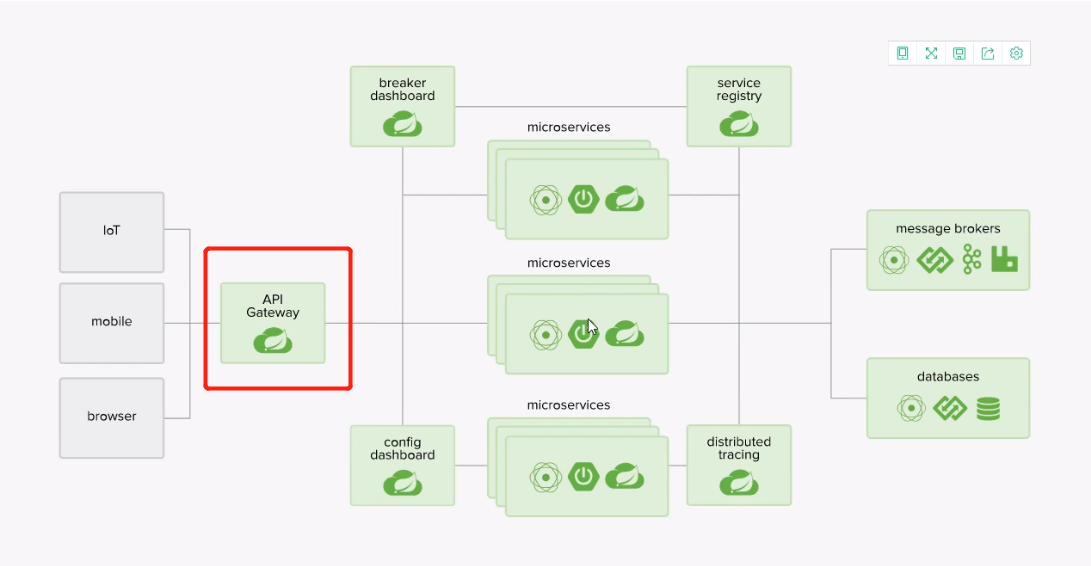
Zuul包含了对请求的路由和过滤的两个最主要的功能:
其中路由功能负责将外部请求转发到具体的微服务实力上(即通过域名转发到我们真实的地址),是实现外部访问统一入口(即整合我们的所有端口)的基础,而过滤功能则负责对请求的处理过程进行干预,是实现请求校验,服务聚合等功能的基础。
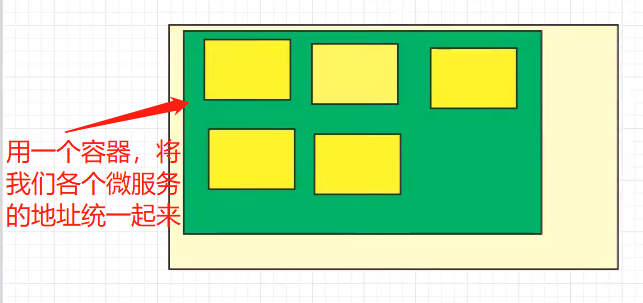
Zuul和Eureka进行整合,将Zuul自身注册为Eureka服务治理下的应用,同时从Eureka中获得其他微服务的消息,即以后的访问微服务都是通过Zuul跳转后获得。
- 注意:Zuul服务最终还是会注册进Eureka
- 提供:代理 + 路由 + 过滤 三大功能!
9.2、项目测试
新建模块
springcloud-zuul-6001导入
springcloud-consumer-hystrix-dashboard的所有依赖导入zuul依赖
<!-- spring-cloud-starter-zuul -->
<dependency>
    <groupId>org.springframework.cloud</groupId>
    <artifactId>spring-cloud-starter-zuul</artifactId>
    <version>1.4.6.RELEASE</version>
</dependency>
编写配置文件
application.ymlserver: port: 6001 spring: application: name: springcloud-zuul # 应用程序名 eureka: client: service-url: defaultZone: http://eureka7001.com:7001/eureka/,http://eureka7002.com:7002/eureka/,http://eureka7003.com:7003/eureka/ instance: instance-id: zuul6001.com prefer-ip-address: true info: app.name: springcloud companny.name: blog.springcloud.com创建主启动类,开启zuul代理注解
@SpringBootApplication
@EnableZuulProxy
public class Zuul_6001 {
    public static void main(String[] args) {
        SpringApplication.run(Zuul_6001.class, args);
    }
}
启动
7001,启动8001,启动6001进入
7001,看到两个应用程序那就没问题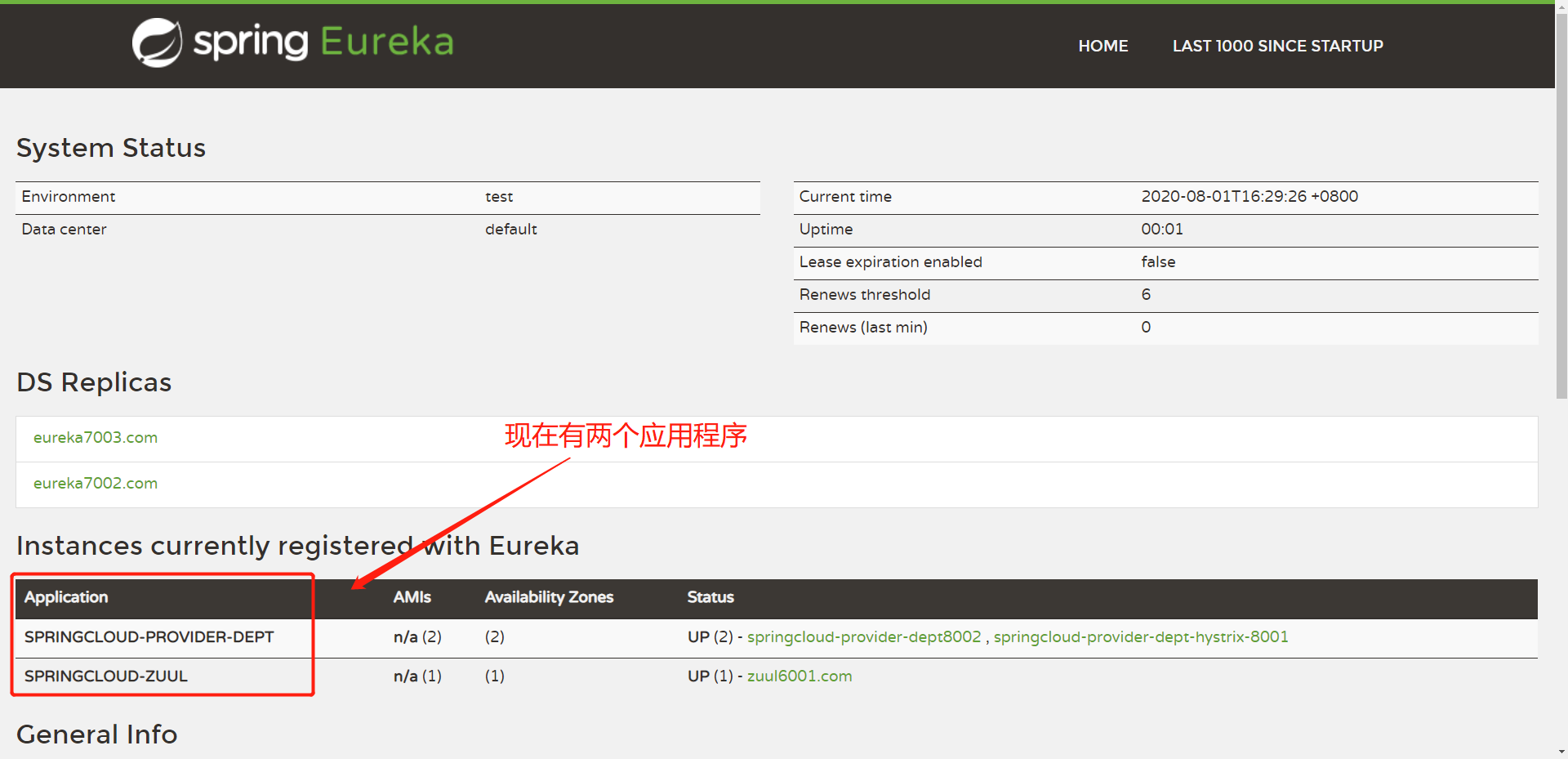
然后进入http://localhost:8001/dept/get/1可以访问到数据

然后使用
6001项目进行访问http://localhost:6001/springcloud-provider-dept/dept/get/1,同样可以访问到使用
http://localhost:6001加要访问的应用名(小写形式)加查询的内容
9.3、路由网关的配置
通过配置文件的配置,我们可以正式实现:
- 统一的访问地址(路由) XXX.path
- 拦截(过滤)直接访问真实的地址ignored-services:
zuul:
  routes:
 mydept.serviceId: springcloud-provider-dept # 绑定原来的服务名称
 mydepr.path: mydept # 自定义服务名称
# ignored-services: springcloud-provider-dept # 不能再使用这个路径访问了
  ignored-services: "*"  # 只能使用自定义服务名访问
prefix: /xj路由的设置:自定义属性前缀,后缀从下图的属性中选择

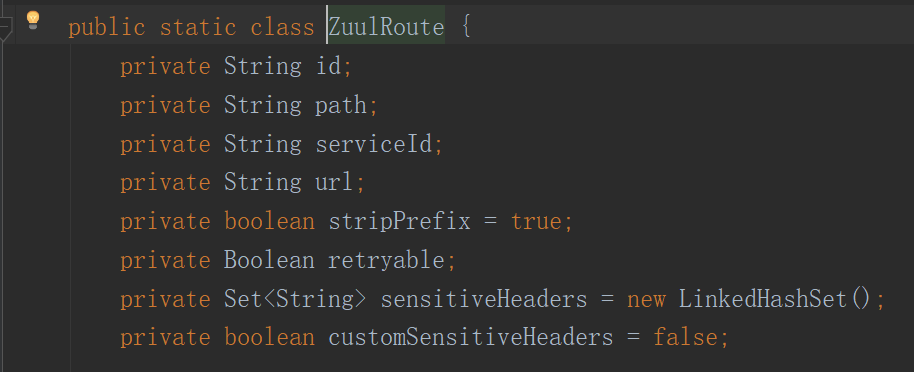
其他更多的配置可以在源码中查看
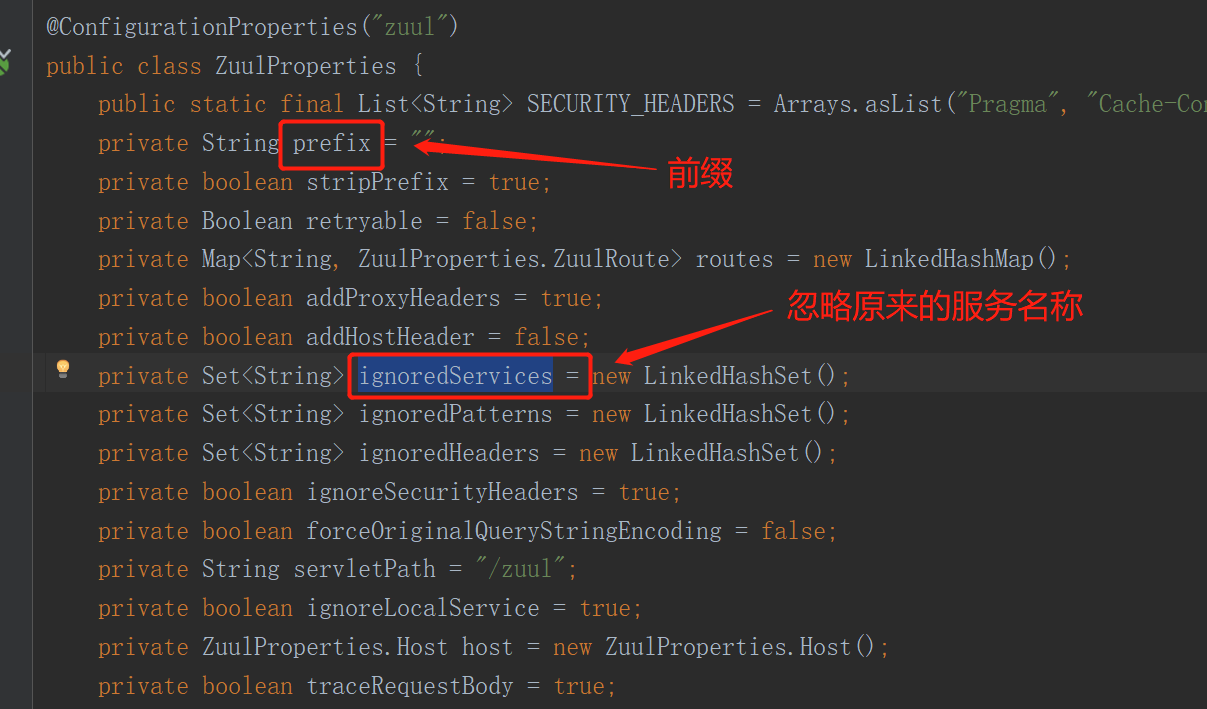
开启测试
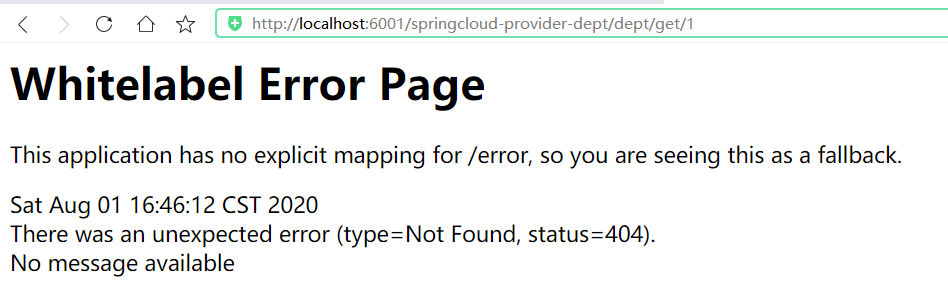
需要有前缀和自定义名称才可以访问

现在我们可以使用6001端口访问原来8001、8002、8003的内容了
10、SpringCloud Config配置
可以使用Github、Coding以及码云,但是码云是速度最快的。
10.1、概述
分布式系统面临的配置文件的问题
微服务意味着要将单个应用中的业务拆分成一个个子服务,每个服务的粒度相对较小,因此系统中会出现大量的服务,由于每个服务都需要必要的配置信息才能运行,所以一套集中式的,动态的配置管理设施是必不可少的。SpringCould提供了ConfigServer来解决这个问题,我们每一个微服务自己带着一个application.yml,那上百个的配置文件要修改起来,岂不是要发疯!
什么是SpringCloud Config分布式配置中心
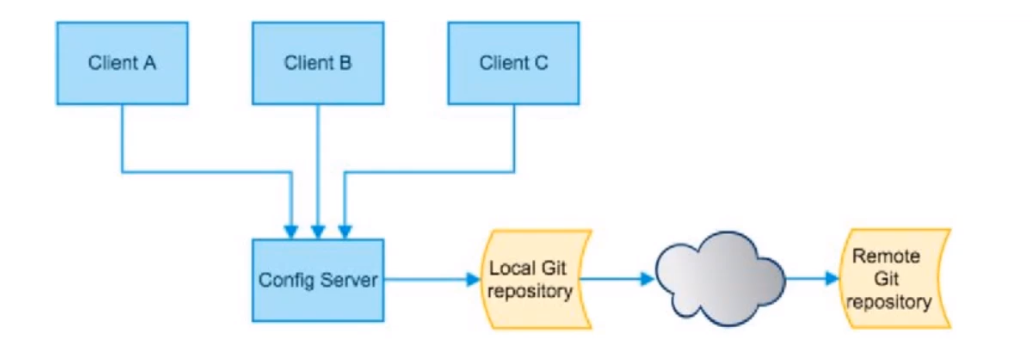
SpringCould Config为微服务架构中的微服务提供集中化的外部配置支持,配置服务器为每个不同微服务应用的所有环节提供了一个中心化的外部配置。
SpringCloud Config分为服务端和客户端两部分;
- 服务端也成为分布式配置中心,它是一个独立的微服务应用,用来连接配置服务器为客户端提供配置信息,加密,解密信息等访问接口
- 客户端则是通过指定的配置中心来管理应用资源,以及与业务相关的配置内容,并在启动的时候从配置中心获取和加载配置信息。配置服务器默认采用git来存储配置信息,这样就有助于对环境配置进行版本管理。并且可以通过git客户端工具来方便的管理和访问配置内容。
SpringCloud Config配置中心能干嘛
- 集中管理配置文件
- 不同环境,不同配置,动态化的配置更新,分环境部署,比如 /dev /test /prop /beta /release
- 运行期间动态调整配置,不再需要在每个服务部署的机器上编写配置文件,服务会向配置中心统一拉取配置自己的信息
- 当配置发生变动时,服务不需要重启,即可感知到配置的变化,并应用新的配置【需要热部署插件】
- 将配置信息以REST接口的形式暴露
SpringCloud Config分布式配置中心与Github整合
- 由于SpringCloud Config默认使用Git来存储配置文件,也有其他方式,比如支持SVN和本地文件,但最推荐的还是Git,而且使用的是http/https访问的形式
10.2、环境搭建
安装和使用Git:这个可以在docsify文档中查看
创建新仓库
springcloud_config向仓库提交
application.yml文件spring: profiles: active: dev --- spring: profiles: dev application: name: springcloud-config-dev --- spring: profiles: test application: name: springcloud-config-test新建模块
springcloud-config-server-3344导入依赖(先不需要导入Eureka,不然会一直刷)
<dependencies>
    <!--spring-boot-starter-web-->
    <dependency>
        <groupId>org.springframework.boot</groupId>
        <artifactId>spring-boot-starter-web</artifactId>
    </dependency>
    <!--actuator完善监控信息-->
    <dependency>
        <groupId>org.springframework.boot</groupId>
        <artifactId>spring-boot-starter-actuator</artifactId>
    </dependency>
    <!-- spring-cloud-config-server -->
    <dependency>
        <groupId>org.springframework.cloud</groupId>
        <artifactId>spring-cloud-config-server</artifactId>
        <version>2.1.1.RELEASE</version>
    </dependency>
</dependencies>
编写配置
server:
  port: 3344

spring:
  application:
    name: springcloud-config-server
  cloud:
    config:
      server:
        git:
          uri: https://gitee.com/lxjblog/springcloud_config.git # 这里使用的是Https 不是SSH
编写主启动类
Config_Server_3344,开启服务注解@SpringBootApplication @EnableConfigServer public class Config_Server_3344 { public static void main(String[] args) { SpringApplication.run(Config_Server_3344.class, args); } }启动该项目测试,访问
application-dev.yml,可以输出文件中的内容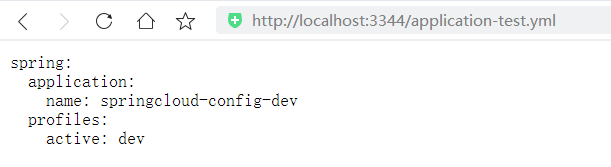
因为我们在
application.yml文件中使用了---形成多文档块
除此之外,还有以下几种访问方式:
application为文件名,profile为工作环境,label为分支(master)
/{application}/{profile}[/{label}]
/{application}-{profile}.yml 【上方就是这种】
/{label}/{application}-{profile}.yml
/{application}-{profile}.properties
/{label}/{application}-{profile}.properties
10.3、Config客户端
对客户端来说只是访问本地文件,然后通过服务端帮我们去进行查询
创建
config-client.yml文件spring: profiles: active: dev --- server: port: 8201 # Spring的配置 spring: profiles: dev application: name: springcloud-provider-dept # Eureka的配置,注册到哪里 eureka: client: service-url: defaultZone: http://eureka7001.com:7001/eureka/ --- server: port: 8202 # Spring的配置 spring: profiles: test application: name: springcloud-provider-dept # Eureka的配置,注册到哪里 eureka: client: service-url: defaultZone: http://eureka7001.com:7001/eureka/提交到码云上
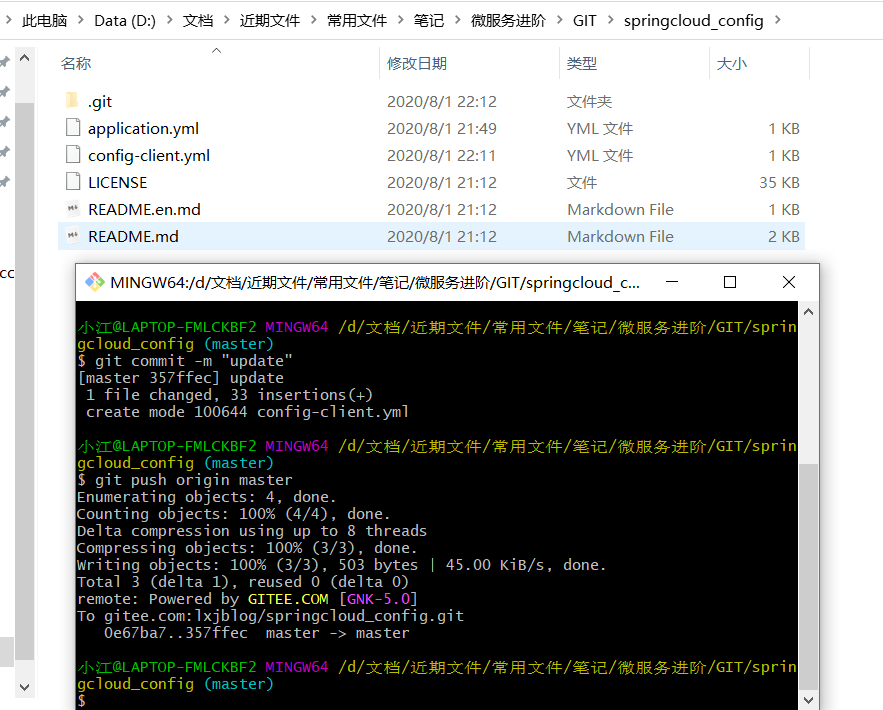
创建新模块
springcloud-config-client-3355导入依赖
<dependencies>
    <!--spring-boot-starter-web-->
    <dependency>
        <groupId>org.springframework.boot</groupId>
        <artifactId>spring-boot-starter-web</artifactId>
    </dependency>
    <!--actuator完善监控信息-->
    <dependency>
        <groupId>org.springframework.boot</groupId>
        <artifactId>spring-boot-starter-actuator</artifactId>
    </dependency>
    <!-- spring-cloud-starter-config -->
    <dependency>
        <groupId>org.springframework.cloud</groupId>
        <artifactId>spring-cloud-starter-config</artifactId>
        <version>2.1.1.RELEASE</version>
    </dependency>
</dependencies>
编写配置文件
bootstrap.yml# 系统级别的配置 spring: cloud: config: name: config-client # 需要从git上获取的文件名,不需要后缀 profile: dev # 工作环境 label: master # 主分支 uri: http://localhost:3344 # 服务端的地址编写配置文件
application.yml# 用户级别的配置 spring: application: name: springcloud-config-client注意区别:
bootstrap:是系统级别的配置,因为连接到远端可能会出错,所以这里使用这个application:用户级别的配置编写控制类
ConfigClientController@RestController public class ConfigClientController { @Value("${ spring.application.name} ") private String applicationName; @Value("${ eureka.client.service-url.defaultZone} ") private String eurekaServer; @Value("${ server.port} ") private String port; @RequestMapping("/config") public String getConfig(){ return "applicationName: " + applicationName + "eurekaServer: " + eurekaServer + "port: " + port; } }编写主启动类测试
@SpringBootApplication
public class Config_Client {
    public static void main(String[] args) {
        SpringApplication.run(Config_Client.class, args);
    }
}
启动
3344和当前项目进行测试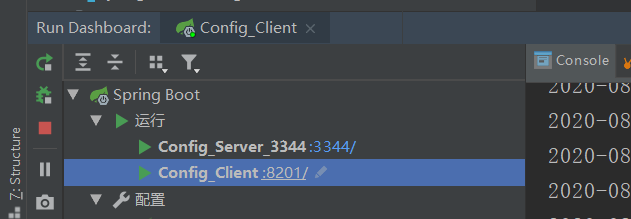
【注意:当前项目的端口号是8201,这是读取到git上的文件,因为在
bootstrap.yml中我们配置了profile: dev访问dev环境,**所以我们可以通过远端配置我们项目的端口号信息了,使代码可读性降低~**】访问测试,成功读取到信息

当我们把
bootstrap.yml文件的环境改为testspring: cloud: config: profile: test # 工作环境
10.4、远程配置实战
代码上传
编写远程配置
config-eureka.yml集群的注册中心spring: profiles: active: dev --- server: port: 7001 # Spring的配置 spring: profiles: dev application: name: springcloud-config-eureka # Eureka配置 eureka: instance: hostname: eureka7001.com # Eureka服务端的实例名称 client: register-with-eureka: false # 表示是否向Eureka注册中心注册自己 fetch-registry: false # 为false表示自己为注册中心 service-url: # 监控页面 # 集群(关联其他的注册中心) defaultZone: http://eureka7002.com:7002/eureka/,http://eureka7003.com:7003/eureka/ --- server: port: 7001 # Spring的配置 spring: profiles: test application: name: springcloud-config-eureka # Eureka配置 eureka: instance: hostname: eureka7001.com # Eureka服务端的实例名称 client: register-with-eureka: false # 表示是否向Eureka注册中心注册自己 fetch-registry: false # 为false表示自己为注册中心 service-url: # 监控页面 # 集群(关联其他的注册中心) defaultZone: http://eureka7002.com:7002/eureka/,http://eureka7003.com:7003/eureka/创建
config-dept.yml文件spring: profiles: active: dev --- server: port: 8001 # mybatis配置 mybatis: type-aliases-package: com.xj.springcloud.pojo config-location: classpath:mybatis/mybatis-config.xml mapper-locations: classpath:mybatis/mapper/*.xml # Spring的配置 spring: profiles: dev application: name: springcloud-provider-dept datasource: type: com.alibaba.druid.pool.DruidDataSource driver-class-name: com.mysql.cj.jdbc.Driver url: jdbc:mysql://localhost:3306/db01?serverTimezone=GMT&createDatabaseIfNotExist=true&useUnicode=true&characterEncoding=utf-8&autoReconnect=true username: root password: 1234 # Eureka的配置,注册到哪里 eureka: client: service-url: defaultZone: http://eureka7001.com:7001/eureka/,http://eureka7002.com:7002/eureka/,http://eureka7003.com:7003/eureka/ instance: instance-id: springcloud-provider-dept8001 # info配置 info: app.name: xj-springcloud company.name: lxjblog.gitee.io --- server: port: 8001 # mybatis配置 mybatis: type-aliases-package: com.xj.springcloud.pojo config-location: classpath:mybatis/mybatis-config.xml mapper-locations: classpath:mybatis/mapper/*.xml # Spring的配置 spring: profiles: test application: name: springcloud-provider-dept datasource: type: com.alibaba.druid.pool.DruidDataSource driver-class-name: com.mysql.cj.jdbc.Driver url: jdbc:mysql://localhost:3306/db02?serverTimezone=GMT&createDatabaseIfNotExist=true&useUnicode=true&characterEncoding=utf-8&autoReconnect=true username: root password: 1234 # Eureka的配置,注册到哪里 eureka: client: service-url: defaultZone: http://eureka7001.com:7001/eureka/,http://eureka7002.com:7002/eureka/,http://eureka7003.com:7003/eureka/ instance: instance-id: springcloud-provider-dept8001 # info配置 info: app.name: xj-springcloud company.name: lxjblog.gitee.io提交到码云上
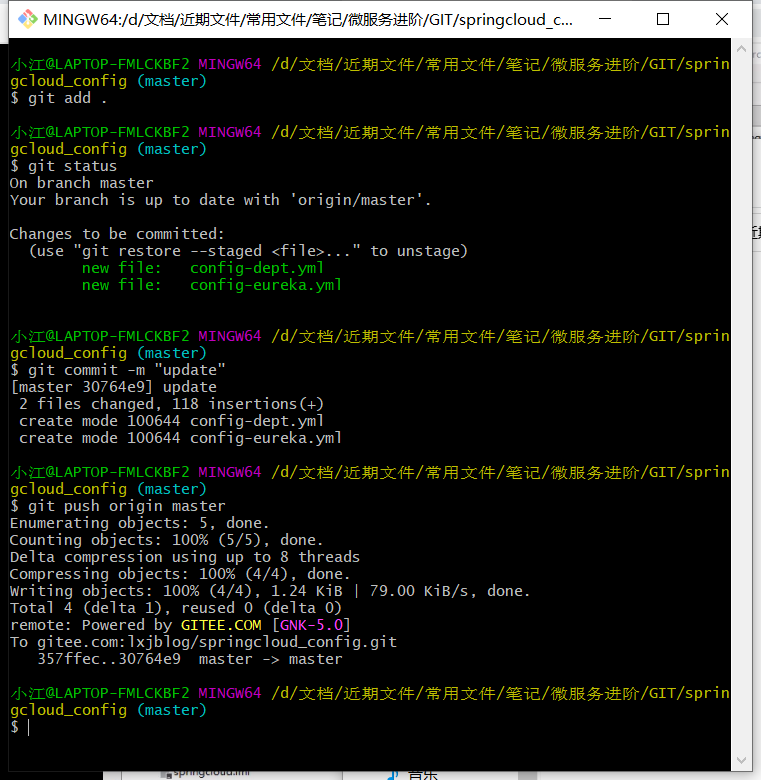
获取文件
创建新模块
springcloud-config-eureka-7001拷贝原来的内容
导入config依赖
<dependencies>
    <!-- spring-cloud-starter-eureka-server -->
    <dependency>
        <groupId>org.springframework.cloud</groupId>
        <artifactId>spring-cloud-starter-eureka-server</artifactId>
        <version>1.4.6.RELEASE</version>
    </dependency>
    <!--热部署工具-->
    <dependency>
        <groupId>org.springframework.boot</groupId>
        <artifactId>spring-boot-devtools</artifactId>
    </dependency>
    <!-- spring-cloud-starter-config -->
    <dependency>
        <groupId>org.springframework.cloud</groupId>
        <artifactId>spring-cloud-starter-config</artifactId>
        <version>2.1.1.RELEASE</version>
    </dependency>
</dependencies>
编写配置文件
bootstrap.ymlspring: cloud: config: name: config-eureka label: master profile: dev uri: http://localhost:3344编写
application.yml文件spring: application: name: springcloud-config-eureka-7001启动访问:启动
3344,测试是否可以读取到信息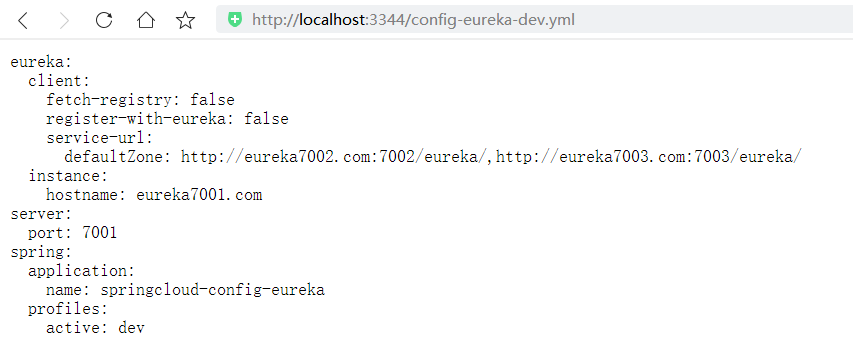
没问题,然后使用客户端进行连接,访问成功即可
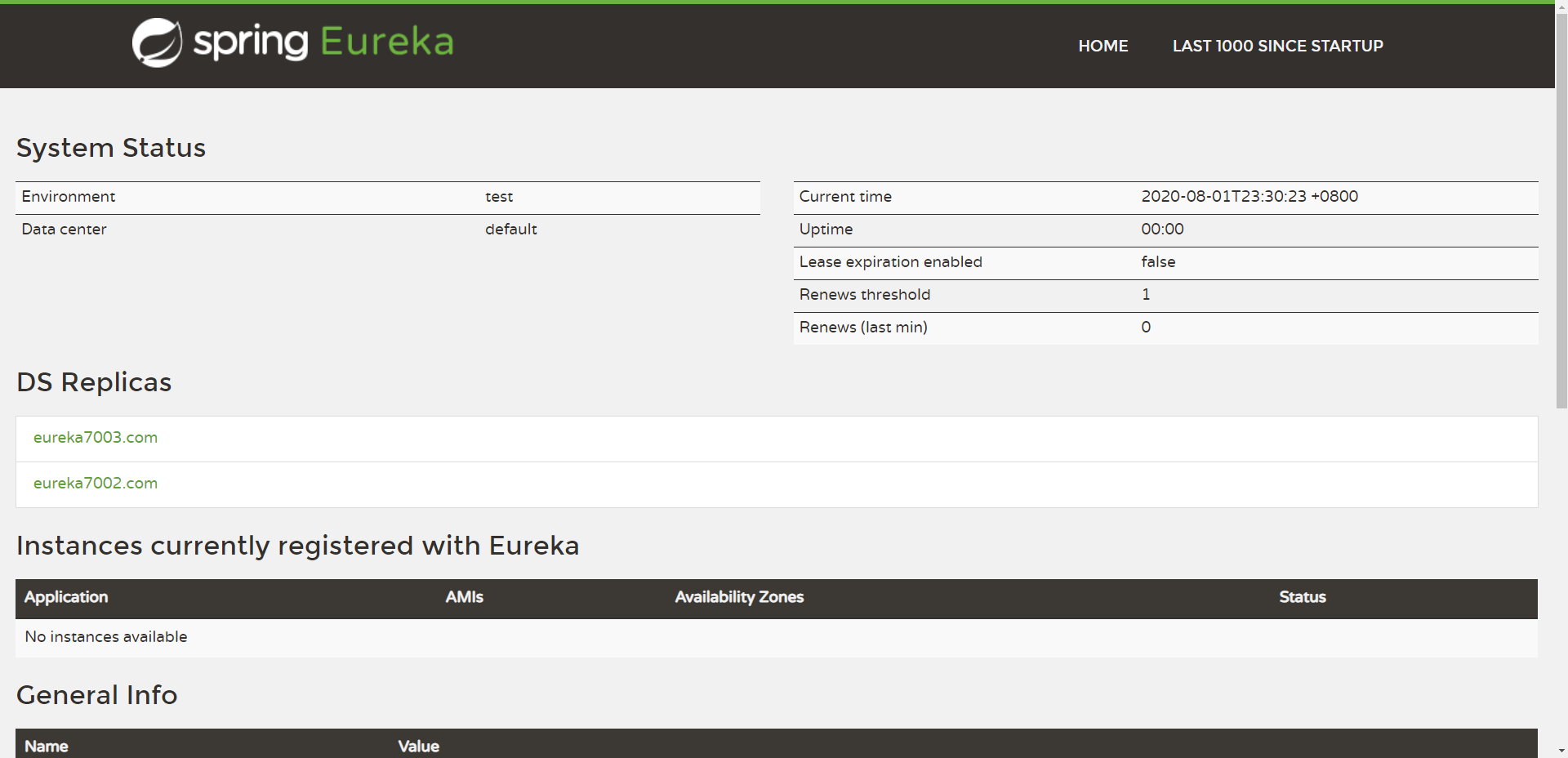
创建新的8001提供者
创建新模块
springcloud-config-dept-8001拷贝内容,依赖和代码
添加congfig的依赖
<!-- spring-cloud-starter-config -->
<dependency>
    <groupId>org.springframework.cloud</groupId>
    <artifactId>spring-cloud-starter-config</artifactId>
    <version>2.1.1.RELEASE</version>
</dependency>
编写配置文件
bootstrap.ymlspring: cloud: config: name: config-dept label: master profile: dev uri: http://localhost:3344application.ymlspring: application: name: springcloud-config-dept-8001修改启动类名称
启动项目测试
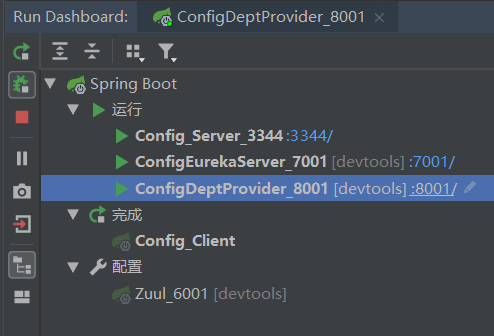
访问测试:成功查询出数据

【注意:客户端会在程序启动的时候获取服务的配置文件信息,所以当你直接在git上修改数据之后,使用客户端获取到的数据仍然是更新前的,需要重新启动项目才会获取到新的数据】
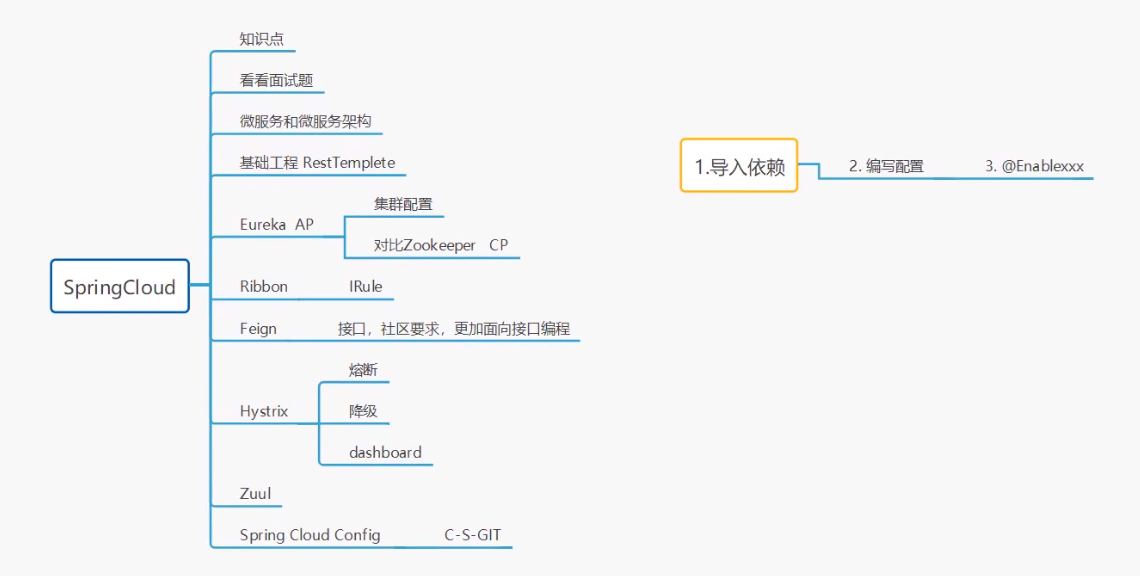
- 本文链接:https://lxjblog.gitee.io/2020/08/02/SpringCloud/
- 版权声明:本博客所有文章除特别声明外,均默认采用 许可协议。