
BIO
Java中的BIO,即Blocking I/O(同步阻塞I/O),是传统的Java IO编程方式。它的特点是同步并阻塞,服务器实现模式为一个连接一个线程。也就是说,当客户端有连接请求时,服务器端会启动一个线程进行处理。如果这个连接在一段时间内没有进行数据读写操作,那么线程就会处于阻塞状态,等待数据的到来。这种方式在连接数较少且固定的场景下表现良好,但对于连接数较多或需要高并发的场景,BIO可能会导致线程资源的浪费和性能瓶颈。
在BIO的工作机制中,服务器端会启动一个ServerSocket,注册端口,并调用accept方法监听客户端的Socket连接。当客户端发起连接请求时,服务器端的accept方法会返回一个新的Socket对象,然后服务器端会为这个Socket对象创建一个新的线程来处理数据读写操作。
示例代码:
以下代码通过 ServerSocket 创建连接,当调用 serverSocket.accept() 方法时将会阻塞等待连接,这种情况下这个主线程只能接受一个连接
public class BIOServer {
    public static void main(String[] args) {
        try {
            // 创建ServerSocket对象并监听指定端口
            ServerSocket serverSocket = new ServerSocket(8080);
            // 等待客户端连接
            Socket socket = serverSocket.accept();
            // 获取输入流,读取客户端发送的数据
            BufferedReader in = new BufferedReader(new InputStreamReader(socket.getInputStream()));
            System.out.println(in.readLine());
            // 获取输出流,向客户端发送数据
            PrintWriter out = new PrintWriter(socket.getOutputStream(), true);
            out.println("Hello from server!");
            // 关闭资源
            in.close();
            out.close();
            socket.close();
            serverSocket.close();
        }  catch (IOException e) {
            e.printStackTrace();
        }
    }
}
public class BIOClient {
public static void main(String[] args) {
try {
// 创建Socket对象并连接到服务器
Socket socket = new Socket("localhost", 8080);
// 获取输出流,向服务器发送数据
PrintWriter out = new PrintWriter(socket.getOutputStream(), true);
out.println("Hello from client!");
// 获取输入流,读取服务器返回的数据
BufferedReader in = new BufferedReader(new InputStreamReader(socket.getInputStream()));
String response = in.readLine();
System.out.println(response);
// 关闭资源
in.close();
out.close();
socket.close();
} catch (IOException e) {
e.printStackTrace();
}
}
} 修改:
如果想使用 bio 实现同时接收多个连接的话,则需要通过创建多个线程用于接收客户端连接
public class BioServer {
    public static void main(String[] args) {
        try {
            ServerSocket serverSocket = new ServerSocket(8080);
            for (int i = 0; i < 2; i++) {
                new Thread(() -> {
                    try {
                        Socket socket = serverSocket.accept();
                        BufferedReader in = new BufferedReader(new InputStreamReader(socket.getInputStream()));
                        while (true) {
                            String x = in.readLine();
                            if (x != null) {
                                System.out.println(x);
                            }
                        }
                    }  catch (IOException e) {
                        e.printStackTrace();
                    }
                } ).start();
            }
        }  catch (IOException e) {
            e.printStackTrace();
        }
    }
}
public class BioClient1 {
public static void main(String[] args) {
try {
Socket socket = new Socket("localhost", 8080);
PrintWriter out = new PrintWriter(socket.getOutputStream(), true);
for (int i = 0; i < 10; i++) {
out.println("[连接1]:Hello from client!");
TimeUnit.SECONDS.sleep(2);
}
out.close();
socket.close();
} catch (IOException e) {
e.printStackTrace();
} catch (InterruptedException e) {
e.printStackTrace();
}
}
} public class BioClient2 {
public static void main(String[] args) {
try {
Socket socket = new Socket("localhost", 8080);
PrintWriter out = new PrintWriter(socket.getOutputStream(), true);
for (int i = 0; i < 10; i++) {
out.println("[连接2]:Hello from client!");
TimeUnit.SECONDS.sleep(2);
}
out.close();
socket.close();
} catch (IOException e) {
e.printStackTrace();
} catch (InterruptedException e) {
e.printStackTrace();
}
}
} 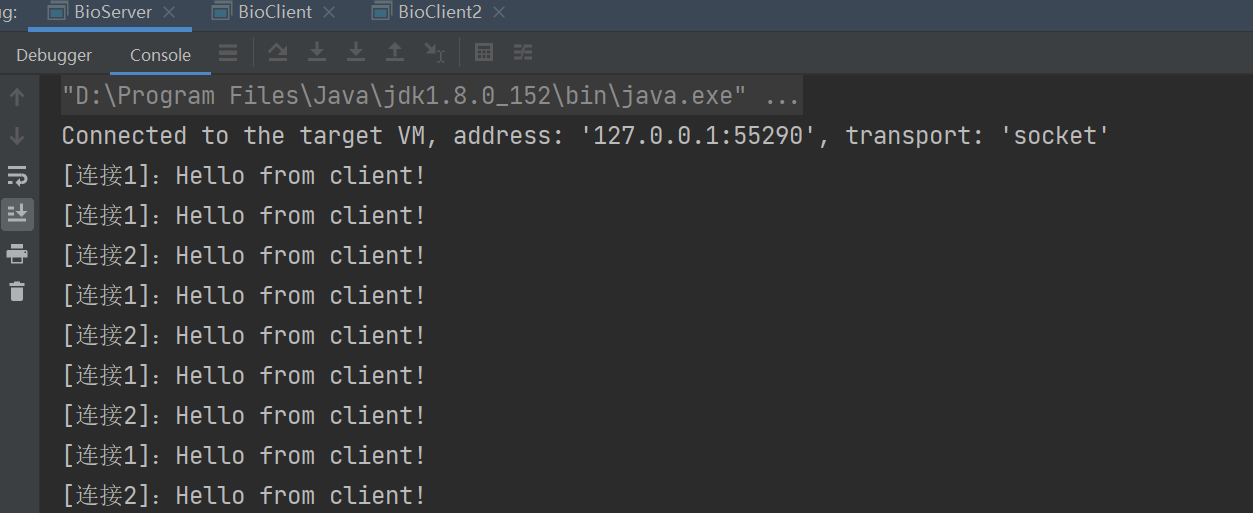
所以通过 bio 同样可以实现多个客户端建立长连接,但是这样的话一个客户端就需要占用服务端一个线程
NIO
Java的NIO(New I/O)是Java中的一个非阻塞I/O模型,也是I/O多路复用的基础。从JDK 1.4开始,Java提供了一系列改进的输入/输出处理的新特性,这些特性被统称为NIO。
NIO的主要特点包括:
- 非阻塞IO:与传统的IO流(如FileInputStream和FileOutputStream)不同,NIO的流是非阻塞的。这意味着,当线程调用读取或写入方法时,如果没有数据可读或无法写入数据,线程不会阻塞,而是可以继续执行其他任务。这大大提高了并发性和系统吞吐量。
- 通道(Channels)和缓冲区(Buffers):NIO使用通道和缓冲区来处理数据。通道是数据进出的通道,而缓冲区则用于存储数据。所有的I/O操作都是通过通道开始的,数据总是从通道中读入缓冲区,或者从缓冲区写入到通道中。
- 多路复用:NIO引入了选择器(Selector)的概念,它允许一个单独的线程监视多个通道,以查看哪些通道已经准备好进行读取或写入操作。这大大减少了线程的数量,提高了系统的可伸缩性。
NIO的应用场景非常广泛,包括网络编程、文件操作、数据库操作以及多线程数据同步等。在网络编程中,NIO的高并发性能使得它可以高效地处理大量的网络连接和I/O操作。在文件操作中,NIO提供了更高效的读写方式,如内存映射文件(MappedByteBuffer),比传统的InputStream和OutputStream更快、更可靠。
总之,Java的NIO是一个现代化、高效率的IO操作框架,适用于需要高效处理各种数据读写、具有高并发的网络/IO操作、高速光盘读取、大容量文件传输、多线程数据同步等场景。
示例代码:
创建一个 serveSocketChannel 通道
设置非阻塞模式并绑定端口
创建一个 selector
将 serverSocket 的 channel 注册到 selector 中,并指定监听类型
selector.select() 方法会阻塞等待事件触发
selector.selectedKeys() 会获取所有触发过的事件(不会自动清空)
当获取到连接时, 将客户端 socketChannel 注册到 selector 中
public class NioServer {
 public static void main(String[] args) throws IOException {
     int port = 8080;
     // 打开一个ServerSocketChannel
     ServerSocketChannel serverSocketChannel = ServerSocketChannel.open();
     // 设置为非阻塞模式
     serverSocketChannel.configureBlocking(false);
     // 绑定端口
     serverSocketChannel.bind(new InetSocketAddress(port));
     // 打开一个Selector
     Selector selector = Selector.open();
     // 将ServerSocketChannel注册到Selector上,并监听ACCEPT事件
     serverSocketChannel.register(selector, SelectionKey.OP_ACCEPT);
     System.out.println("Server started on port " + port);
     // 处理循环
     while (true) {
         // 阻塞,等待至少一个通道就绪
         int readyChannels = selector.select();
         if (readyChannels == 0) {
             continue;
         }
         // 获取就绪的通道集合
         Set<SelectionKey> selectedKeys = selector.selectedKeys();
         Iterator<SelectionKey> keyIterator = selectedKeys.iterator();

         while (keyIterator.hasNext()) {
             SelectionKey key = keyIterator.next();

             if (key.isAcceptable()) {
                 // 处理新的连接
                 ServerSocketChannel server = (ServerSocketChannel) key.channel();
                 SocketChannel client = server.accept();
                 client.configureBlocking(false);
                 // 将客户端 socketChannel 注册到 selector 中
                 client.register(selector, SelectionKey.OP_READ);
                 System.out.println("Accepted connection from " + client);
             }  else if (key.isReadable()) {
                 // 处理读操作
                 SocketChannel client = (SocketChannel) key.channel();
                 CharsetDecoder decoder = StandardCharsets.UTF_8.newDecoder();
                 // 这里的缓冲区设置了 1024 字节,消息太大时将无法接收
                 ByteBuffer buffer = ByteBuffer.allocate(1024);
                 int bytesRead = client.read(buffer);
                 if (bytesRead == -1) {
                     // 连接关闭
                     client.close();
                 }  else {
                     buffer.flip();
                     CharBuffer charBuffer = decoder.decode(buffer);
                     String data = charBuffer.toString();
                     System.out.println(data);
                 }
             }

             // 从集合中移除已处理的键(注意清除的是 selector 的 selectedKeys 集合,防止重复处理 key)
             keyIterator.remove();
         }
     }
 }
}
netty
Netty 是一个异步事件驱动的网络应用框架,用于快速开发可维护的高性能服务器和客户端。
简单地说 Netty 封装了 JDK 的 NIO,不用再写一大堆复杂的代码。既然代替了原生的 NIO ,肯定有比它好的理由,主要有如下几点:
- Netty 底层IO模型可以随意切换,比如可以从NIO切换到BIO,但一般很少会这么做。
- Netty 自带拆包解包,从NIO各种繁复的细节中脱离出来,让开发者重点关心业务逻辑。
- Netty 解决了 NIO 中 Selector 空轮询 BUG,这个 BUG 应该很多人听说过,虽然官方声明 jdk1.6 的 update18 修复了该问题,只不过是降低了发生的概率。
- 对 Selector 做了很多细小的优化,reactor 线程模型能做到高效的并发处理。
参考文章:
Netty入门与实战教程 - LingBrown - 博客园
基本使用
导入依赖
<dependency>
    <groupId>io.netty</groupId>
    <artifactId>netty-all</artifactId>
</dependency>
服务端代码
在 xxl-job 框架中,就用到了 netty 监听指定端口,然后自定义处理器获取请求内容并处理,所以启动了 socketService 之后也是可以直接通过 http 请求的方式进行请求的
但是如果 Netty 服务器只是简单地作为一个 TCP 服务器,并没有实现 HTTP 协议的处理,那么浏览器发出的 HTTP 请求将不会被正确解析。浏览器期望收到符合 HTTP 协议的响应,而简单的 TCP 服务器可能只返回原始字节流,这不会被浏览器识别为有效的 HTTP 响应
public class NettyServer {

    public static void main(String[] args) throws Exception {
        // 配置服务器的 NIO 线程组
        // 用于接收客户端的连接
        EventLoopGroup bossGroup = new NioEventLoopGroup(1);
        // 用于处理已经被接收的连接
        EventLoopGroup workerGroup = new NioEventLoopGroup();
        try {
            // 创建服务器端的启动对象,配置参数
            ServerBootstrap bootstrap = new ServerBootstrap();
            // 设置两个线程组
            bootstrap.group(bossGroup, workerGroup)
                    // 使用 NIO 的ServerSocketChannel作为服务器的通道实现
                    .channel(NioServerSocketChannel.class)
                    // 设置线程队列等待连接的个数
                    .option(ChannelOption.SO_BACKLOG, 128)
                    // 创建一个通道初始化对象(匿名内部类)
                    .childHandler(new ChannelInitializer<SocketChannel>() {
                        @Override
                        protected void initChannel(SocketChannel ch) throws Exception {
                            // 给 pipeline 设置处理器
                            // 打印日志,方便进行网络调试
                            ch.pipeline().addLast(new LoggingHandler(LogLevel.INFO));
                            // 将接收到的对象转成字符串
                            ch.pipeline().addLast(new StringDecoder());
                            // 将发送对象转成字符串
                            ch.pipeline().addLast(new StringEncoder());
                            // 自定义的处理器
                            ch.pipeline().addLast(new SimpleChannelInboundHandler<String>() {
                                @Override
                                protected void channelRead0(ChannelHandlerContext ctx, String msg) {
                                    System.out.println("Server received: " + msg);
                                    ctx.writeAndFlush("Server response: " + msg);
                                }
                                @Override
                                public void exceptionCaught(ChannelHandlerContext ctx, Throwable cause) {
                                    cause.printStackTrace();
                                    ctx.close();
                                }
                            } );
                        }
                    } );
            // 绑定端口,同步等待成功
            ChannelFuture future = bootstrap.bind(8080).sync();
            // 对关闭通道进行监听
            future.channel().closeFuture().sync();
        }  finally {
            // 优雅地关闭所有的 EventLoopGroup,释放所有的资源
            bossGroup.shutdownGracefully();
            workerGroup.shutdownGracefully();
        }
    }
}
这里是一些关键部分的解释:
- EventLoopGroup: Netty 用于处理 I/O 操作的多线程事件循环。bossGroup 用于接收传入的连接,workerGroup 用于处理已经被接受的连接。
- ServerBootstrap: Netty 用于设置服务器的引导类,它提供了一系列配置方法,用于设置服务器的参数。
- channel(NioServerSocketChannel.class): 指定服务器通道的实现类,这里使用 NIO 的实现。
- option(ChannelOption.SO_BACKLOG, 128): 设置 TCP 参数,SO_BACKLOG 是操作系统用于 TCP 连接队列的长度。
- childHandler(…): 为新接受的连接设置处理器。在这里,我们添加了一个日志处理器、字符串解码器、字符串编码器和自定义的业务处理器。
- addLast(…): 向 ChannelPipeline 中添加处理器。ChannelPipeline 是 Netty 中处理网络事件的关键组件,它管理了一个处理器链,用于处理入站和出站数据以及事件。
- bind(8080).sync(): 绑定服务器到指定端口(这里是 8080),并同步等待操作完成。
- closeFuture().sync(): 等待服务器套接字关闭。这是一种阻塞调用,它会一直等待直到服务器通道关闭。
- shutdownGracefully(): 优雅地关闭 EventLoopGroup,释放所有资源。
请注意,代码示例中还需要一个 NettyServerHandler 类,该类需要继承 ChannelInboundHandlerAdapter 或其他 ChannelHandler 实现,并处理服务器的业务逻辑,例如接收消息、发送响应等。在上面的代码中,NettyServerHandler 被添加到了 ChannelPipeline 中。
客户端代码
public class NettyClient {

    private final String host;
    private final int port;

    public NettyClient(String host, int port) {
        this.host = host;
        this.port = port;
    }

    public void start() throws InterruptedException {
        // 创建客户端事件循环组
        EventLoopGroup group = new NioEventLoopGroup();

        try {
            // 创建客户端启动辅助类
            Bootstrap bootstrap = new Bootstrap();

            // 设置事件循环组
            bootstrap.group(group)
                    // 设置通道类型为NioSocketChannel
                    .channel(NioSocketChannel.class)
                    // 设置日志处理器,用于输出日志信息,便于调试
                    .handler(new LoggingHandler(LogLevel.INFO))
                    // 添加自定义的处理器
                    .handler(new ChannelInitializer<SocketChannel>() {
                        @Override
                        protected void initChannel(SocketChannel ch) throws Exception {
                            // 添加字符串编解码器
                            ch.pipeline().addLast(new StringDecoder());
                            ch.pipeline().addLast(new StringEncoder());
                            // 添加自定义的业务处理器
                            ch.pipeline().addLast(new MyClientHandler());
                        }
                    } );

            // 连接到服务器
            ChannelFuture future = bootstrap.connect(host, port).sync();

            // 等待连接关闭
            future.channel().closeFuture().sync();
        }  finally {
            // 关闭事件循环组
            group.shutdownGracefully();
        }
    }

    /**
     * 自定义的业务处理器,用于处理接收到的消息和发送消息等操作
     */
    private static class MyClientHandler extends SimpleChannelInboundHandler<String> {

        @Override
        protected void channelRead0(ChannelHandlerContext ctx, String msg) throws Exception {
            // 处理接收到的消息
            System.out.println("Received from server: " + msg);
        }

        @Override
        public void exceptionCaught(ChannelHandlerContext ctx, Throwable cause) throws Exception {
            // 处理异常
            cause.printStackTrace();
            ctx.close();
        }

        // 发送消息到服务器
        public void sendMessage(ChannelHandlerContext ctx, String msg) {
            ctx.writeAndFlush(msg);
        }
    }

    public static void main(String[] args) throws InterruptedException {
        // 创建Netty客户端并启动
        new NettyClient("localhost", 8080).start();
    }

}
Http 服务器
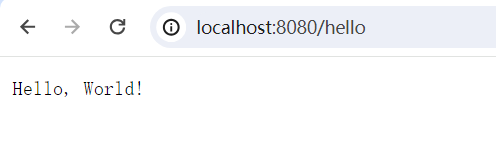
在自定义处理器的实现接口中,指定类型为 FullHttpRequest 即可接收和返回 http 响应
public class NettyServer {

    public static void main(String[] args) throws Exception {
        // 配置服务器的 NIO 线程组
        // 用于接收客户端的连接
        EventLoopGroup bossGroup = new NioEventLoopGroup(1);
        // 用于处理已经被接收的连接
        EventLoopGroup workerGroup = new NioEventLoopGroup();
        try {
            // 创建服务器端的启动对象,配置参数
            ServerBootstrap bootstrap = new ServerBootstrap();
            // 设置两个线程组
            bootstrap.group(bossGroup, workerGroup)
                    // 使用 NIO 的ServerSocketChannel作为服务器的通道实现
                    .channel(NioServerSocketChannel.class)
                    // 设置线程队列等待连接的个数
                    .option(ChannelOption.SO_BACKLOG, 128)
                    // 创建一个通道初始化对象(匿名内部类)
                    .childHandler(new ChannelInitializer<SocketChannel>() {
                        @Override
                        protected void initChannel(SocketChannel ch) throws Exception {
                            ChannelPipeline pipeline = ch.pipeline();
                            // 添加 HTTP 编码器和解码器
                            pipeline.addLast(new HttpServerCodec());
                            // 添加 ChunkedWriteHandler 来支持大文件的流式传输
                            pipeline.addLast(new ChunkedWriteHandler());
                            // 添加聚合器,将多个消息转换成单一的 FullHttpRequest 或 LastHttpContent
                            pipeline.addLast(new HttpObjectAggregator(65536));
                            // 添加自定义的处理器
                            pipeline.addLast(new SimpleChannelInboundHandler<FullHttpRequest>() {
                                @Override
                                protected void channelRead0(ChannelHandlerContext ctx, FullHttpRequest request) throws Exception {
                                    // 这里处理 HTTP 请求
                                    FullHttpResponse response = new DefaultFullHttpResponse(
                                            HttpVersion.HTTP_1_1,
                                            HttpResponseStatus.OK,
                                            Unpooled.copiedBuffer("Hello, World!", CharsetUtil.UTF_8)
                                    );
                                    response.headers().set(HttpHeaderNames.CONTENT_TYPE, "text/plain");
                                    response.headers().set(HttpHeaderNames.CONTENT_LENGTH, response.content().readableBytes());
                                    // 发送响应
                                    ctx.writeAndFlush(response).addListener(ChannelFutureListener.CLOSE);
                                }

                                @Override
                                public void exceptionCaught(ChannelHandlerContext ctx, Throwable cause) throws Exception {
                                    cause.printStackTrace();
                                    ctx.close();
                                }
                            } );
                        }
                    } );
            // 绑定端口,同步等待成功
            ChannelFuture future = bootstrap.bind(8080).sync();
            // 对关闭通道进行监听
            future.channel().closeFuture().sync();
        }  finally {
            // 优雅地关闭所有的 EventLoopGroup,释放所有的资源
            bossGroup.shutdownGracefully();
            workerGroup.shutdownGracefully();
        }
    }
} 
- 本文链接:https://lxjblog.gitee.io/2024/06/03/netty/
- 版权声明:本博客所有文章除特别声明外,均默认采用 许可协议。